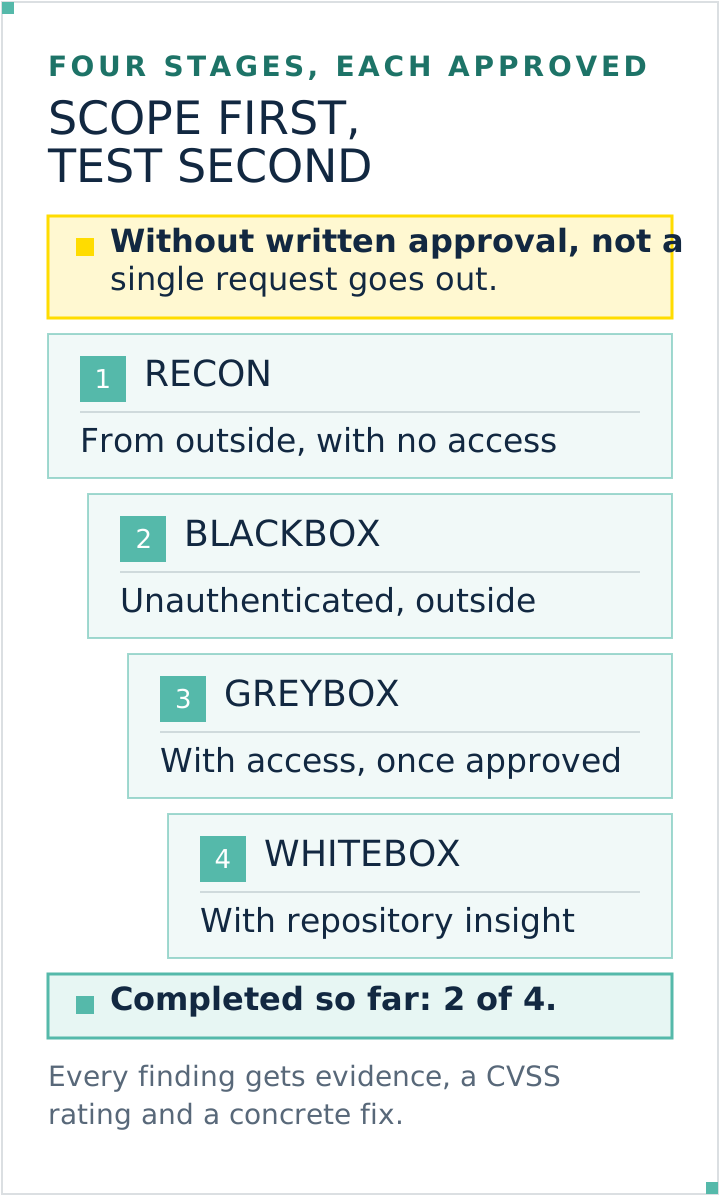
A commissioned security test runs in five parts. Before the first request goes out, the scope, time window, contacts and abort criteria are set down in writing. That is the start of the authorisation chain, not the whole of it: provider terms, third-party systems and the rights of the person commissioning the test still have to be checked. The tester then works from outside in, first without access and only where expressly approved with credentials or source-code access. I use recon, blackbox, greybox and whitebox as an engagement model, not as mandatory OWASP stages. Findings receive evidence, a reasoned CVSS vector and a concrete fix, followed by a retest after the repair.
In my own business this work is done by an AI employee who runs exactly this process, with its own frame and its own approval per engagement. More on that below. If you want to look for yourself first, before commissioning anyone, Check Your Website Security Online is the cheaper way in. Why I hand work like this over at all is in Bringing AI to a Small Business.
What gets settled before the first request
Agency pages like to treat this part as a preliminary. It is not. Section 202a of the German Criminal Code requires specially protected data and the overcoming of access protection; section 202b concerns the unauthorised interception of non-public data transmission. Not every passive request to a public page meets those elements. Conversely, a client's permission does not automatically cover infrastructure belonging to a host, software provider or other tenants. My firm rule is therefore written authorisation plus a check of the full permission chain, provider terms, data processing, test data and applicable law. This is not legal advice.
Seven points have proven themselves in my own template:
Point
What it says
Scope
Which addresses, which application, which environment. An approval for the main address does not cover a staging environment on a secondary address.
Time window
From when to when testing happens, and whether outside business hours.
Contacts
One reachable person on each side, plus an emergency contact.
Depth
Which stages are approved, so whether from outside only or also with credentials.
Exclusions
Usually load and stress testing, trying out credentials, changing or deleting data.
Abort criteria
When testing stops on the spot: instability, unexpected access to real data, a target belonging to a third party.
Confidentiality
Who may see the report, how it is handed over, what happens to the test data afterwards.
Two things get overlooked regularly here. First, the person commissioning the test must actually be authorised for every system touched; a host or SaaS provider may require prior approval, a time window or specific methods. Second, anything not expressly approved is not in scope.
The stages: from outside in
Tests differ mainly in how much the tester knows and is given beforehand. Four stages are common.
Stage
Starting point
What it finds
Recon
No access, only what is publicly reachable
Forgotten secondary addresses, old staging environments, delivered files that give away the technology in use
Blackbox
The view of a visitor who is not signed in
Misconfigured servers, exposed admin areas, information leaks in error messages, weak encryption
Greybox
Credentials for an ordinary user account
The area behind the login: can user A see or change user B's data
Whitebox
Plus a look at the source code
Logic flaws invisible from outside, and credentials sitting in the code
Not every project needs all four. Test depth follows the attack surface rather than the stage name: which data is present, which technology is involved, how often it changes and which risk you accept. An external baseline may be appropriate for a largely static site, but it is not proof of completeness because it cannot see source code, file permissions or many server-side flaws. Define the test objectives and WSTG categories for each engagement.
The basic pattern is not one provider's invention: the Web Security Testing Guide itself lists several established methodologies, among them the Penetration Testing Execution Standard with its seven phases from pre-engagement to reporting, the NIST guide 800-115, and OSSTMM.
Four testing stages with written approval before the first request. Graphic: Kevin Welter
The checklist: twelve areas
As a freely available checklist I use the Web Security Testing Guide, which describes itself as the premier cybersecurity testing resource. Version 4.2 is the current stable release, version 5.0 is in progress (as of September 2026). It splits testing a web application into twelve areas:
Area
What it covers
Information gathering
What the application gives away about its technology and structure
Configuration and deployment
Server settings, files shipped by accident, admin interfaces
Identity management
Roles, registration, creating and disabling accounts
Authentication
Sign-in, password rules, password reset, second factor
Authorisation
Who may do what, and whether that line can be crossed
Session management
Cookies, sign-out, timeouts, actions slipped in from elsewhere
Input validation
The largest block: what happens to input and uploads
Error handling
Whether error messages give away internals
Cryptography
Transport encryption, stored data, weak algorithms
Business logic
Flows that are technically correct and commercially damaging
Client-side
Everything running in the visitor's browser
APIs
Programming interfaces, often tested less strictly than the interface
The list is a test frame, not a tick sheet with a guaranteed outcome: it says where to look, not what you will find. It is still useful in a sales conversation. Ask which of these areas the quoted scope includes. A quote without authorisation and business logic is not a bad quote, it is a different one.
How findings are rated, and where the number stops
At the end you have a list, and the list needs an order. The common standard for that is the Common Vulnerability Scoring System, maintained by a working group at FIRST.Org, currently at version 4.0 from November 2023. It translates the properties of a vulnerability into a number between 0 and 10, and that number into levels: 0.1 to 3.9 low, 4.0 to 6.9 medium, 7.0 to 8.9 high, 9.0 to 10.0 critical. CVSS 4.0 has four metric groups, Base, Threat, Environmental and Supplemental. Most reports quote only the Base value, the properties of the gap itself, with nothing about your surroundings.
That beats "critical" by feel because the rating follows named properties and can be challenged with reasons. It is not perfectly objective: two testers can assess individual metrics differently. The report therefore needs the CVSS vector and the reasoning alongside the number.
And now the limit that few people mention: a CVSS number does not know your business context. The FIRST specification says so itself. Users are to enrich the Base metrics with Threat and Environmental values specific to their own use of the affected system, in order to arrive at a more comprehensive input to risk assessment. And it names factors that sit outside CVSS and still decide the order: regulatory requirements, the number of customers impacted, monetary losses from a breach, life or property threatened, reputational impact.
Translated into your day: a finding rated "medium" in the one form all your enquiries come through can be more urgent for you than a "high" in an area you are switching off next month anyway. The number sorts the technology, you decide the order. A good tester therefore asks beforehand what carries your business.
What a usable report contains
This is where good work separates from bad. A report that names a finding but does not say how to reproduce it and how to repair it is worthless, because nobody can work with it: your developer cannot follow it, and the retest has no basis. The effort the tester saved lands with you.
The Web Security Testing Guide describes the usual structure in its reporting chapter: an introduction with version status, scope, limitations, timeframe and test team, an executive summary without technical detail, an overview table of all findings with reference, title and risk level, then the individual findings. Each individual finding, per the guide, carries among other things exploitability, impact, a risk level from informational to critical, a detailed description and, in its words, detailed steps on how to remediate the vulnerability, plus evidence such as screenshots.
Ask for a sample report before the engagement and look at three things:
Does every finding carry evidence? A screenshot, a request, a log line. Without evidence it is an assertion.
Does it say how to reproduce the finding? A developer who cannot reproduce it will file it as a false alarm.
Is the repair proposal concrete? "Validate input" is not a proposal. Which parameter, in which place, with which setting, that is one.
A fourth point belongs here even though it is rarely named: false positives are the norm with automated testing. A usable report therefore says what someone verified by hand and what a tool merely matched as a pattern.
After handover: the retest
Handover is not the end of the engagement, it is the middle. What follows runs in four steps in my business: set the order, repair, retest, document the residual risk. The order is your decision, for the reason above. Repairs happen in batches, and not everything gets repaired: for some findings the right decision is to carry the risk deliberately and write that down with a date and a reason. The retest walks the repaired findings one by one, along exactly the reproduction steps from the report, and is therefore much faster than the first pass. A finding counts as closed only after that, because a repair nobody has verified is an intention.
The next sensible occasion after that is not a date in the calendar, it is a change: a rebuild, a move, a new payment or booking module. That is precisely when redirects, permissions and certificates shift. For the two things that shift back fastest there are separate guides here: How to Check an SSL Certificate and, if you run the server yourself, Securing Your Own Server.
How Falk runs this process
This is exactly the process Falk runs in my business, my AI employee for security. He tests in the four stages above and follows five phases within a stage: taking stock of the technology in use purely from publicly delivered files rather than assumptions, an attack surface model along the sign-in and session flow, manual tests, a tool check of encryption and known patterns, and finally the assessment. Every finding comes with evidence, a CVSS rating and a concrete fix.
Three things about that put the above into practice. The approval: before a single request goes to the target system, a written approval for exactly that system is in place, with its own frame per engagement. The pace: the automated part runs throttled at no more than 20 requests per minute, with no load or stress testing and no trying out credentials. And the abort criteria: instability, unexpected data access, a target belonging to a third party, or warnings about too many requests stop the test on the spot. The finished report then passes a separate review role before I see it.
That every engagement gets its own frame and its own approval is also why Falk does not exist as a ready-made package to download: there would be an off-the-shelf security test only if there were an off-the-shelf system to test. How he proceeds in detail, and where I hold him back, is on Finding Security Flaws: Meet Falk.
Frequently asked questions
How long does a website security audit take?
That comes down to two things, the scope and the approved stages. The view from outside is the fastest part, manual testing of access rights behind the login the slowest, because someone has to sign in with several accounts and probe boundaries one at a time. Either way, insist on a fixed time window in the commissioning rather than a verbal promise about duration; the same drivers also decide what a security audit costs.
Do I get a certificate after the audit?
No, not in the usual sense. A test report is not a certificate, it is a snapshot with a date. The term usually covers three different things: your website's SSL certificate, which has nothing to do with a security test and is explained in How to Check an SSL Certificate, a provider's seal for a scan passed at one point in time, or a certification, which as a rule covers organisation and processes rather than a single application.
Is a free online tool not enough?
For a start it beats nothing, and for the certificate, security headers and outdated software it gives usable results. What stays systematically invisible is everything behind the login, everything server-side and every flaw in business logic. Which free tools do what, and where they stop, is in Check Your Website Security Online.
Who is allowed to commission a test at all?
The authorised party for every system touched. On your own infrastructure that is usually the operator; with a host, CDN, SaaS product or rented software, provider terms and additional approval may apply. Check the authorisation chain rather than relying only on the client's name.
Is it worth it for a company site with no customer accounts?
An external baseline can be proportionate for a largely static site, but a public company site can still have an admin area, forms, third-party scripts, a build pipeline and vulnerable components. Choose depth from the actual attack surface, changes and risk, not merely from the absence of customer accounts.
How to carry on
Write the commissioning before you request quotes, not after. Seven lines are enough for the first sketch: scope, time window, emergency contacts, depth, exclusions, abort criteria and confidentiality. Before testing, turn that into the actual agreement with authorisation chain, data protection, liability, evidence handling and emergency procedure. It makes quotes comparable, but is not by itself the whole legal basis. Ask for a sample report and check it for evidence, protected reproduction details and a concrete repair proposal. The route to a role that runs this process is in my community, AI Employee Framework.
Kevin Welter
Developer, IT architect, author of technical books (Kubernetes, cloud infrastructures) and speaker. Runs his business with an AI workforce of fifteen AI employees and shows solo business owners in his community how to hire their first AI employee.