September 17, 2026 · Updated on September 21, 2026 · 15 min read
Orchestrating Multiple AI Agents
Graphic: Kevin Welter
Orchestrating multiple AI agents does not mean having two windows open at the same time. Orchestration starts at the point where three things are settled: every agent owns a responsibility defined by its output rather than by its tools, every handover is written down, and one place checks whether a report matches what actually happened. In my experience the jump from one agent to two is the bigger one, not the jump from two to five, because it forces exactly those three rules. The technical reason is simple: according to Anthropic's documentation, a subagent runs in its own context window and does not see your conversation history. Whatever agent one held in its head has to be written down for agent two, otherwise it does not exist. It fails at the same four places almost every time: vague briefs, duplicated work, too much parallelism on the same file, and unchecked reports.
I run my business with a workforce of fifteen AI employees, each with its own role, its own personnel file and its own limits. Who does which job is laid out in the org chart. They call each other: my SEO role asks the content desk for experience notes, the desk passes a video brief to the editor, and a lead role reviews the result afterwards. This post was written that way too: keyword analysis and draft from my SEO role, the build onto the website from a second one, and I approved it. How the workforce grew is in My AI Workforce: Fifteen Employees, One Boss, and everything on agents lives on the AI agents page.
What changes once the second agent arrives
With one agent, you are the context: you see every intermediate step, and when something goes wrong you correct it in the same conversation. With two agents, that shared context disappears all at once.
One agent
Two or more agents
Context
shared, you are in the middle of it
separate, each one sees only its own brief
Brief
"carry on as discussed" is enough
goal, format, sources and limits belong in the brief
Handover
happens inside the conversation
has to exist as a file, or it is lost
Permissions
you see every tool call
set per role: who reads, who changes
Overview
you read every result yourself
one place condenses, you decide
Anthropic's subagent documentation describes the context cut precisely: a subagent gets its own system prompt, the task text, the project's CLAUDE.md hierarchy and the skills you preload for it. What it does not get: your conversation history, the files your main session has already read, and the skills that ran there. That is not a flaw, it is the point: it is what keeps your main session lean.
The most uncomfortable part comes last: from the second agent onwards, in my experience, you stop reading everything. That is the real reason for orchestration.
Four patterns that hold
1. Split roles by output, not by tool
The durable dividing line runs along the output: who delivers what, and who is finished afterwards. "One researches, the other writes" is a good split, because the handover is a finished document. "One uses web search, the other the file system" is a bad one, because both are holding different ends of the same task and neither finishes it.
Anthropic's report on its own multi-agent research system shows what happens when the boundary is missing: in one run, a subagent investigated the 2021 chip crisis while two others worked in parallel on current supply chains. Duplicated work, paid for three times. Their conclusion: every subagent needs an objective, an output format, guidance on tools and sources, and clear task boundaries.
2. Handovers get written, not shouted across the room
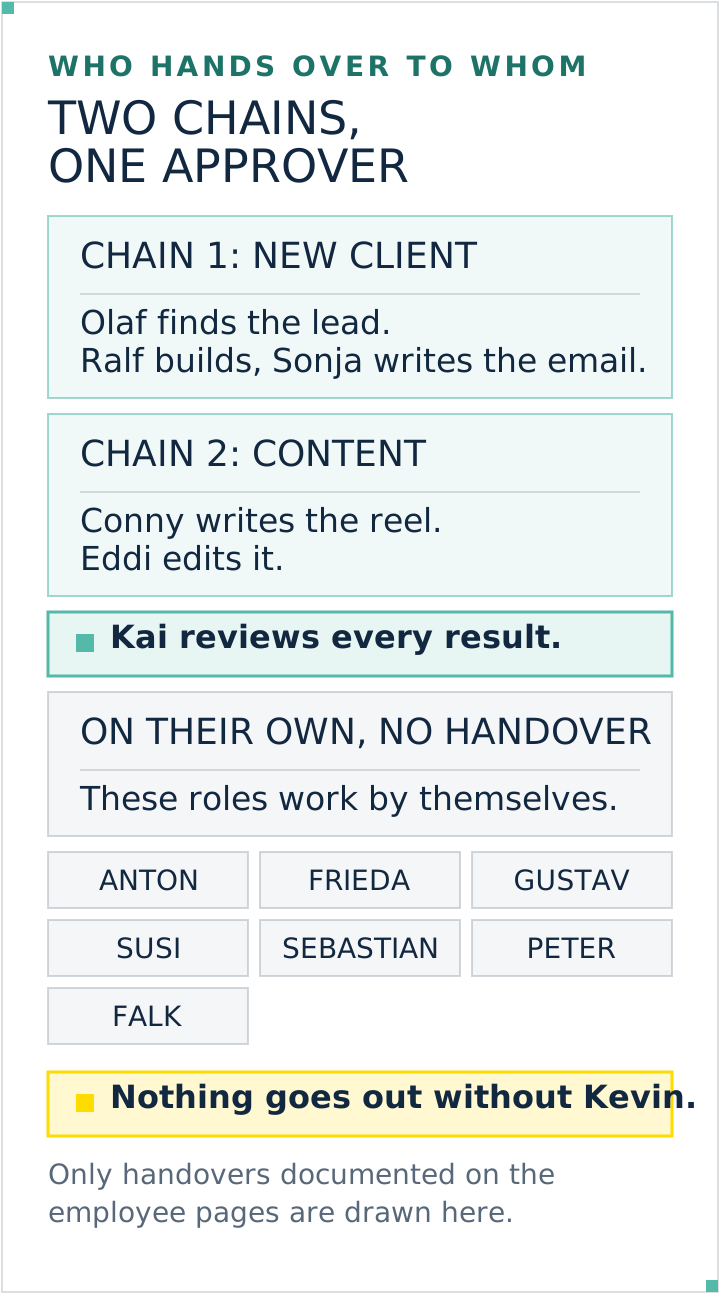
Every handover here runs through the same deliberately boring protocol. The sender puts a handover file into its own outbox and a copy into the recipient's inbox. It contains sender, recipient, date, the request, a link to the context and the open points including risks. Every employee checks its inbox at the start of a session and moves read notes into a done folder.
Two details make the difference. First, the link instead of the copy: there is one source instead of several transcripts. Copies go stale quietly, a path at worst gets renamed once. Second, the outbox on the sender's side: weeks later it is still verifiable who handed over what and when. An agent has no memory across sessions, your file system does. What that durable role context looks like is in CLAUDE.md: Claude Code's Memory.
3. One place that keeps the overview
At three reports a day you read three reports. At ten you skim them. From there you need a place that reads before you do and condenses: what is done, what is stuck, what you need to decide.
What matters is what that place actually does. A dashboard shows numbers. An overview role compares the claim against the evidence: the report says six pages are live, so the six addresses get fetched. When it finds no evidence, it writes "not verified" instead of smoothing over the gap.
4. Author and reviewer are never the same instance
Anything that leaves the house here is reviewed by a separate role in a fresh context, not by the same run that produced it. The reason is documented: self-correction without outside review makes results worse, external review makes them better (Huang et al., ICLR 2024). The flip side belongs in the picture too: a reviewer you ask to find gaps will always find gaps. That is why my review briefs say "only report what affects correctness". The practical rules for such review roles are in Claude Code Subagents: Best Practices, and the difference between subagent, skill and agent in Claude Subagents, Skills, Agents.
Documented handovers connect specialised roles while approval stays with a person. Graphic: Kevin Welter
Step by step: adding the second agent
Write down what agent one delivers. Not what it does, but what exists at the end: a file, a format, a location. That is the interface agent two starts from.
Cut agent two along the next output. Take the task that lands on your desk once agent one is finished. That is almost always the right second agent, and almost never the one that "also does some research".
Set the brief up as a letter. Goal, output format, permitted sources and tools, limits, and a link to the context. Without those parts the work gets duplicated.
Set the permissions. Read-only roles get no write access. Anything that changes state gets a gate in front of it. In my setup, every personnel file carries three levels: free, only after approval, never.
Set up the mail route. One folder for inbox, one for outbox, one for done. Ten minutes of work, and the handover chain is traceable instead of shouted.
Run them one after the other first, not in parallel. Simultaneity pays off only once the handover holds. On September 8, 2026 a build and its review ran in parallel here, and the "done and checked" message had to be withdrawn.
Put a review place in front before the third one arrives. From three agents onwards nobody here reads everything any more, and that is the moment an overview role becomes cheaper than a missed mistake.
If you notice at step 1 that agent one delivers no clean output at all but a conversation, what is missing is not the second agent but the training of the first. How that works is in Hiring an AI Employee: The Process, and which tasks qualify in Which Tasks You Can Hand Off to AI.
Who gets to see and change what
This question gets skipped with the first agent and takes revenge with the third. Three levels are enough.
Tool permissions per role. The docs offer two fields: tools as an allowlist, disallowedTools as a denylist, with the denylist applied first. A reviewer gets read tools and no Write. One detail that easily goes wrong: a subagent's tool list and the finer permission rules are two different levels. An entry like disallowedTools: Bash(git push *) removes the entire Bash tool according to the docs, not just that one command. To keep Bash and block only that command, put it into your permission rules as a deny rule instead.
Access to other people's work. My rule: everyone may read everything, nobody changes someone else's results. Whoever has an objection writes a note into that colleague's feedback folder. It sounds cumbersome and saves a lot of trouble, because two instances never end up on the same file.
The approval gate. Anything that goes outside or changes state is approved by me, with wording and timestamp in the log. No agent sends an email, no agent puts anything online, no agent spends money. Where exactly the line between reviewing and deciding runs is in What Can an AI Lead Role Decide?. What such a gate looks like technically in Claude Code and n8n is shown in Human in the Loop: Meaning and Examples.
Where it breaks
Mistake
How you notice
Remedy
Vague task boundary
two agents deliver the same thing in different words
goal, format, sources, limits in every brief
Context in someone's head
agent two asks about things agent one long knew
handover as a file, link to the context
Too much parallelism
contradictory versions of the same file
one after the other until the handover holds
No review step
reports read well, the real state differs
separate review role, claim against evidence
Wanting to read it all yourself
you are the bottleneck, the agents wait
one place that condenses
Wrong occasion
the task needs one shared context throughout
stay with a single agent
The last point is the most expensive one. A multi-agent system, meaning several agents working on one task together, costs more to begin with: Anthropic names two figures about its own multi-agent system that belong together: agents typically use around four times the tokens of a chat, multi-agent systems around fifteen times. And domains where all agents have to share the same context, or that involve many dependencies between agents, are not a good fit today. So two agents are not progress in themselves, they pay off on genuinely independent subtasks. Five blog posts on five topics: yes. Five changes to the same file: no.
What this role looks like here
The place that keeps the overview here is called Kai. He has no interface of his own, he reads what the others leave behind anyway: every employee's git history, the reports and protocols in the shared repository, and the mailbox. After a session he holds every claim against the state on the file system and the live website, and writes a short report of what I need to decide.
His review from September 5, 2026 shows what that looks like. He checked two colleagues' work and found three things: an incomplete correction pass on a customer website, where the blog posts had been fixed but the underlying pages left unchanged, so the site contradicted itself in five places; an employee who had been sitting on an unrestricted permission level; and a knowledge file a script had changed without any log showing who was behind it. The same review confirmed a completed rollout in the other direction: six core routes checked live, the outdated sentence at zero hits afterwards, the new one present twice.
That is the difference between several independently running agents and actual orchestration. Kai reports both ways, what checks out and what is missing. He decides nothing: no call on substance, no approval, no commit. That is exactly why the role works. The full version is on Kai, who keeps the overview.
Kai is not a starter employee, he assumes several agents already running. Anyone heading there builds him themselves, and nobody has to do that alone: we walk that path together in my community and in the calls. The entry point is Learn Claude: The Path in Five Stages, and which tasks make good first agents is shown by the ten cases in AI Agents: 10 Real-World Examples.
Frequently asked questions
How many AI agents before orchestration is worth it?
There is no fixed number. The usable rule of thumb is not a count but a behaviour: the moment you start skimming reports instead of reading them, you need a place that reads before you do. Here that role did not arrive on day one, but once the workforce was already running.
Does a second AI agent see what the first one did?
Not on its own. According to Anthropic's documentation, a subagent runs in its own context window and does not see the main session's conversation history. It sees its task text, its system prompt and the project files it is allowed to read. That is why every handover has to exist as a file.
Is a workforce of Claude agents a multi-agent system?
In form, yes: several roles working agentically, each with its own context, connected through written handovers and a review place. What "agentic" means precisely, and where the line to generative AI runs, is in Agentic AI Explained: What It Is and Isn't. The difference from a system that runs through on its own is the approval: nothing goes outside without my word, and the overview role decides nothing on substance.
Is a dashboard enough instead of a lead role?
A dashboard shows that a run finished. It does not check whether the result is correct. The decisive move is matching claim against evidence: the report says live, so fetch the address. The report says replaced, so search the project for the old wording. No status display does that, a role with a review brief does; whether your business needs an AI lead role yet is settled in its own post.
How do I stop two AI agents doing the same work?
By giving every brief an objective, an output format, permitted sources and explicit boundaries. Anthropic observed in its own runs that subagents work redundantly without those, up to three agents on the same topic. The boundary belongs in the brief, not in your hopes.
How many AI agents can run at the same time?
The current default, according to the Claude Code docs retrieved on September 20, 2026, is 20 concurrent subagents and three levels of nesting, both adjustable through environment variables. Those are values of a product version, not a permanent ceiling, and earlier versions had different ones. In practice the number is a limit anyway, not a recommendation: every instance loads its context afresh, and parallel runs on the same file produce contradictory versions.
What may an overview role decide on its own?
Here: nothing on substance. It reviews, condenses, asks questions and flags gaps, but approves nothing, changes no one else's results and commits nothing. It hands out substantive tasks only on my explicit instruction. That separation between reviewing and deciding is the reason I let it do the reviewing at all.
How to take it further
Write down two sentences: what does your running agent deliver, and which task starts once it is finished. The second sentence describes your second agent. Set up the brief for it, create the three mailbox folders, and run both one after the other. Once that handover has run cleanly twice, you have orchestrated, everything beyond that is the same mechanism at larger scale.
The path there, from the first session to your own workforce, is what we walk through step by step in my community, with the ready-made role packages as a starting point.
Kevin Welter
Developer, IT architect, author of technical books (Kubernetes, cloud infrastructures) and speaker. Runs his business with an AI workforce of fifteen AI employees and shows solo business owners in his community how to hire their first AI employee.