AI reliably handles four steps in bookkeeping today, and none of them entirely on its own. First, it reads receipts: date, invoice number, amount, tax amount and supplier are lifted out of a photo, a PDF or an e-invoice and dropped into the entry fields. Second, it proposes an account, by comparing the receipt against your existing set of bookings and deriving the account and the tax code from it. Third, it matches payments against receipts, meaning bank transactions and statement line items against the receipts you actually have. Fourth, what is missing falls out of that automatically: every line item that cannot be matched to a receipt stays visible as an open point. What AI does not take over is stated just as plainly on the vendors' own pages: a proposal stays a proposal. sevDesk writes that the AI's assignment proposals are not adopted automatically as binding, and that every assignment has to be checked and confirmed by you. DATEV says even for receipts classified as reliable: check your bookkeeping in these cases too, as usual (as of September 2026). Responsibility for the figures stays with the business owner, the tax return stays with the tax advisor, and an entry once recorded is not quietly overwritten: section 146 (4) of the German Fiscal Code (AO) requires the original content to remain ascertainable. Correcting is allowed, changing without a trace is not.
Here, this part of the work has not gone through me since 19 August 2026, but through Peter, my AI employee for receipts and bookkeeping. He works in my bookkeeping interface in the browser, screens the receipts that have come in, sets the receipt type and matches the statement against them line by line. What an AI employee actually is, and how it differs from a chatbot, is in What Is an AI Employee?. This post is about the tools and what they deliver today. The duties, deadlines and tax status behind all of it, meaning cash-basis accounting, retention, the GoBD and the small-business rule, are covered in Bookkeeping Basics for the Self-Employed.
The four steps AI takes over today
For this comparison I split the workflow into four steps. Vendors name them differently and not every product covers all four, but as a grid it works for bookkeeping software for freelancers as well as for a solution for an accounting firm.
1. Receipt recognition: from the image into the form
This is the most mature step, and the vendors compared here have it built in. For its own receipt capture, sevDesk describes optical character recognition reading out the receipt date, invoice number, amount, VAT and supplier and entering them into the form. Lexware Office puts it almost identically: text recognition automatically reads out the relevant receipt data, including multi-line entries such as line items on an invoice. In DATEV Unternehmen online the function is called Buchungsassistent online; according to the vendor page, information relevant to booking and payment, such as the business partner's name, is read from the receipt image and pre-filled in the entry fields automatically. The route to the receipt is the same everywhere: photograph it with a phone, upload it at the desk, or forward the invoice by email to a collection address (as of September 2026).
With e-invoices this step largely disappears, because the data is already structured inside the document and no longer has to be guessed from an image. That is the real reason e-invoicing changes bookkeeping more than any AI feature does: recognizing is harder than reading.
2. Account proposal: account and tax code
This is where AI in the narrower sense begins. DATEV describes its Automatisierungsservice Rechnungen like this: the booking proposals are created by an artificial intelligence, for which the invoices are analyzed and compared against the knowledge in the existing set of bookings. According to the same page, the service determines the tax code and the business partner account from the receipt compared with earlier bookings. The learning part is the decisive one: as soon as a booking proposal is confirmed or changed, the AI learns from it, so the proposals keep getting better.
The tools aimed at freelancers work the same way, just with less account knowledge behind them. sevDesk makes an AI-supported proposal for the booking category and learns from the assignments. Lexware Office says it also classifies more complex items such as entertainment expenses or fixed assets, and recognizes recurring receipts by itself (as of September 2026). For business meals, the category does not replace your own note with purpose and participants; what goes on it is in Business Meal Receipts in Germany: Template.
What that means in practice: an account proposal is pattern recognition over your own past. DATEV and sevDesk both describe confirmed or corrected assignments feeding into later proposals. Neither vendor says how quickly that shows, there is no measurement on the product pages. So anyone starting without a history does more reworking at the beginning.
3. Matching: statement against receipts
The step that eats the most time and requires the least thought. Every line on a bank statement or a card statement needs an assignment you can follow, and for most expenses that is a receipt. Bank fees, tax payments, transfers between your own accounts or owner's drawings, on the other hand, occur without an invoice: they need an assignment, but not a third-party receipt. sevDesk describes this as intelligent bank matching: the system automatically recognizes which payments on the business account belong to a receipt and links them, while checking and confirming stays with the user. GetMyInvoices lists automatic matching of bank and credit card transactions explicitly in its feature overview. For business trips one item is always missing from the card statement, the meal allowance; how card, receipts and allowances come together in one report is covered in Per Diem Germany 2026: Rates and Template.
Matching is where good automation separates from bad. Two line items with the same amount on the same day cannot be told apart by an amount search. A tool that guesses here creates more work than it saves: you re-check every assignment instead of only the unclear ones. How an AI employee reconciles a card statement line by line and hands over the unclear cases as a list is shown in a test run in Credit Card Reconciliation: An AI Test Run.
4. Finding missing receipts
This is not a feature of its own but a by-product of step three, and it is the underrated benefit. Once every statement line has been assigned, one list is left over: the lines that ought to have a receipt and do not. That is the list of what you still have to chase. Services such as GetMyInvoices start exactly here and pull invoices automatically from online portals, mailboxes or an app, so the gap never opens in the first place.
For most one-person businesses this is the step with the largest effect: not the time the booking costs, but the evenings spent clicking through supplier portals because three receipts are missing in December.
Three limits are not technical but legal, and they will not move with the next model either.
Limit
What it means
Source
Responsibility
Statements in a tax return must be made truthfully to the best of your knowledge and belief, and that is you. A proposal you confirm is your statement.
Section 150 (2) AO
Tax advice
Business-like assistance in tax matters may only be provided by those authorized in the statute. Booking ongoing transactions is exempt, but only for people with a commercial qualification and at least three years of practical bookkeeping experience.
Sections 5 (1), 6 (1) no. 1 StBerG
Immutability
An entry may not be changed in a way that makes the original content unascertainable, or that leaves it unclear whether the change was made later.
Section 146 (4) AO
The third row matters most for dealing with AI, and it is often read as stricter than it is. What is forbidden is not the correction, it is overwriting without a trace. The original receipt stays as it is. Recorded data and entries may be corrected, but traceably, with a log instead of a silent change. If a receipt does not match the statement, that is a finding, not a task to smooth over. That is exactly how you spot a usable tool: it reports the discrepancy instead of making it disappear.
a log with timestamps, a control count before and after setting
Limit
can only do what the product does
can only do what the process says
The built-in feature is usually the right choice for the normal case: it sits in the plan you are paying for anyway, and you maintain nothing yourself. What it can do exactly depends on the product, the plan and the country, and that is in your vendor's own service description rather than in any comparison. Your own AI employee pays off where the work is stuck between two systems, for instance when a statement from one portal has to be matched against receipts in another. That is precisely my case. What a setup of inbox, receipts and drafts looks like is in AI Agent for Bookkeeping and Inbox; the finished package for it is called Frieda.
What this looks like here
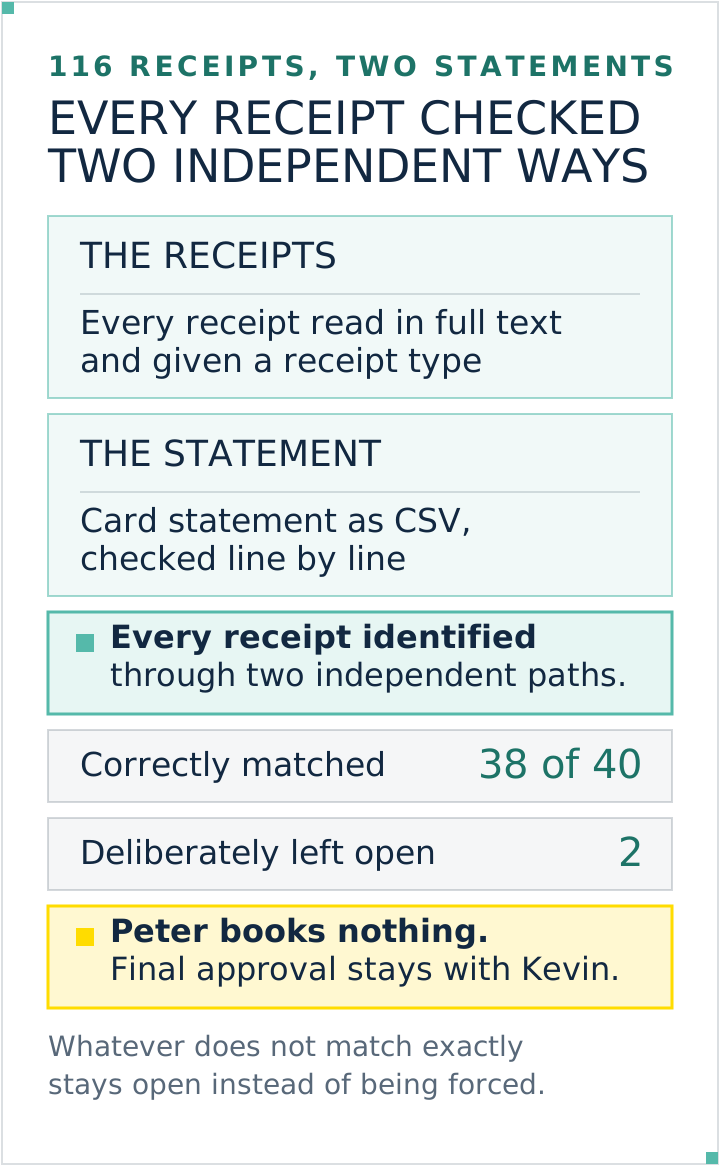
Peter does exactly the four steps above, and he does them in the browser, not through an interface. I made the numbers from his first run public myself: 116 receipts screened, 38 of 40 assigned correctly, a good hour. A second run in September covered 68 receipts, 54 of them checked, with zero discrepancies in the control export.
The two are more interesting than the 38. They stayed open because his process could not decide the case unambiguously, and he reported them as open instead of making them fit. That is the whole difference between an employee and a chatbot: someone who leaves two receipts untouched is worth more than someone who sets all forty and guesses at two.
Three rules are hard-wired. He clicks nothing on suspicion; every state-changing action is covered by a step in an approved process. Amounts, dates and receipt numbers always come from the screen, never from memory. And he does not book: his process covers assigning, matching and the monthly upload of receipts to DATEV Unternehmen online, sign-off stays with me, the tax return stays with the tax advisor. How the browser work runs technically is in Claude in Chrome: How to Use the Extension. Which data I put into an AI system at all is covered in AI and Privacy: What the AI Gets to See.
Receipts and the statement are matched through two paths, while unclear cases stay open. Graphic: Kevin Welter
Common questions
Can AI do bookkeeping?
Parts of it, yes. Reading out receipts, proposing an account, matching payments against receipts and surfacing missing receipts are standard in common bookkeeping software today. Judging a transaction, deciding the doubtful case and filing the return are not. Under section 150 (2) AO the statements must be made truthfully to the best of your knowledge and belief, and that belief has a name and a signature.
Does AI replace the bookkeeper or the tax advisor?
No. What falls away is the preparatory work: sorting, assigning, matching, chasing. What stays is the professional judgment and the responsibility towards the tax office. In practice it shifts the invoice more than the profession: hand over cleanly prepared receipts and you pay less for the tidying up and more for the advice you actually need.
How accurate is AI receipt recognition?
Most vendors give no hit rate, and figures from marketing material would not help you anyway, because the rate depends on your own receipts. What can be said: with structured e-invoices the text recognition step drops out, because the data is already there as fields in the document. It can still be wrong, incomplete or misassigned, so the content check stays. With photos and scans the recognition step is added on top. And account proposals get better, according to the vendor descriptions, when you confirm and correct.
May an AI change my receipts?
Not the original receipt. Recorded receipt data and entries it may correct, but only traceably. Section 146 (4) AO forbids changes that make the original content unascertainable or leave it unclear whether they were made later. What is allowed is the logged correction, not the silent overwrite. A tool that smooths over a discrepancy between a receipt and a statement without recording it is not convenient, it is a problem. The correct reaction is a report.
Is AI bookkeeping worth it for very small businesses?
Usually yes, but not as a separate product. With the vendors compared here the functions are already inside the packages, and for a handful of receipts a month that is exactly the right scope. Your own AI employee only pays off once the work is stuck between two systems, or the volume of receipts grows large enough that matching costs a whole evening.
Do I need training for AI in bookkeeping?
Not for the built-in functions; they are deliberately built to be used without prior knowledge. The useful knowledge sits elsewhere: how to describe a task so that an AI can do it repeatably, and how to check the result. That is a process question, not a bookkeeping question.
How to continue
Start with what you already have. Open your bookkeeping software and check three things: do the receipt details arrive in the form automatically, do you get an account proposal, and is there a match against your bank transactions. If one of those is missing, that is your first lever, ahead of any additional AI tool. Then take a month and count how many line items end up with no receipt. That number is your honest baseline.
Only once both are in place and the monthly assigning still costs you an evening does the step to your own AI employee make sense. Which tasks are suited to it is covered in Which Tasks You Can Hand Off to AI. How such an employee comes about and gets onboarded in the first place is on the page on hiring an AI employee.
The process description behind it you write once yourself, and that is the actual work, not the technology. You do not have to start it alone: how I built my own receipt work, with a written process description, a learning mode and a control count, I show in my community AI Employee Framework. People there have already written the same workflow down for their own business, and bringing a question into a post or a call saves you the first round of trial and error.
Kevin Welter
Developer, IT architect, author of technical books (Kubernetes, cloud infrastructures) and speaker. Runs his business with an AI workforce of fifteen AI employees and shows solo business owners in his community how to hire their first AI employee.