An AI employee is an AI role with a name, a defined job, memory, and rules that works for you permanently. A chatbot answers your question; the big providers do offer memory features by now, but in an ordinary single chat the thread between two tasks is mostly yours to hold. An AI agent works through a goal on its own using tools and decides its path along the way; a fixed role and a memory that grows beyond the single task are not part of the package. That is exactly what an AI employee adds, and not as technology but as organization: a personnel file that holds your business, a learnings file where your feedback lands for good, and rules that say what it may decide alone and what needs your approval. You don't write a new prompt for every task. You brief it once, train it, and delegate from then on.
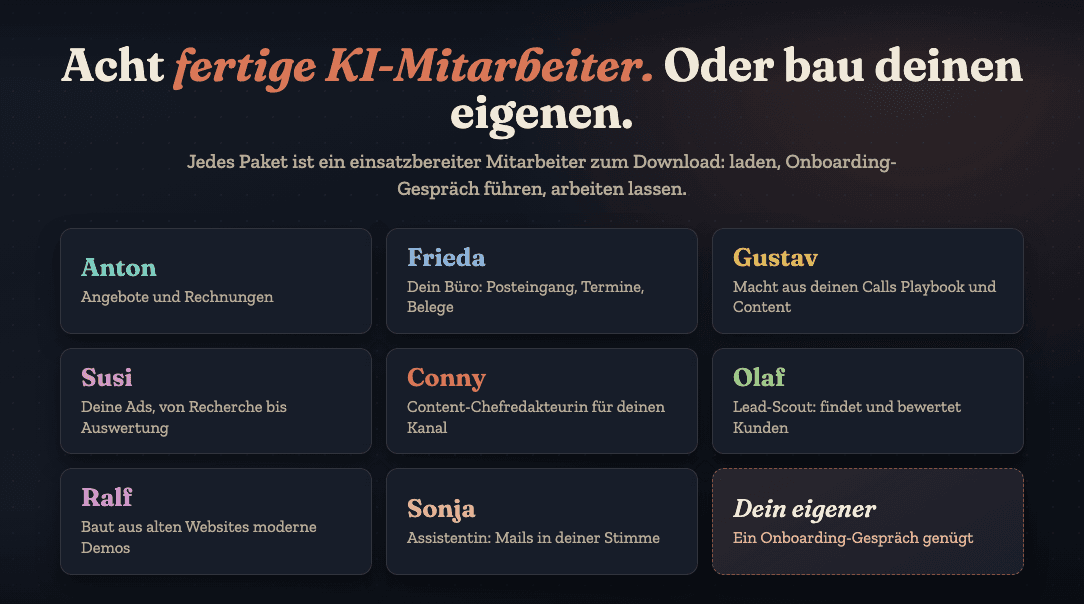
My whole AI workforce runs on this principle: content, SEO, video, bookkeeping, client projects. Every employee is a folder on my computer with a file, rules, and memory. Eight of these roles exist as ready-made packages in my community. All the fundamentals are on the page Hiring an AI employee.
What is an AI employee? The definition
An AI employee isn't a new technology, it's a way of managing AI. That is how I use the term in my own business; the industry has no binding definition for it. Four things turn a language model into an employee in my setup:
- A name and a job. Not "the AI", but, say, an employee who prepares proposals. One area of responsibility, clearly defined, and just as clear: what is not its job.
- A personnel file. It holds everything the employee needs for the job: your services, your wording, your rules, your examples, growing with every piece of feedback.
- Memory. Every correction goes into a learnings file and applies from then on. On the next task, the employee starts from what it has learned from you, not from zero.
- Rules and an approval gate. What may it do alone, and what goes to you? My rule: nothing leaves the house without my approval, logged with a timestamp.
The result: you delegate a task completely and get finished work back for approval, not a snippet you have to assemble yourself.
Chatbot, AI agent, AI employee: the difference
The three terms get mixed up constantly. The table shows how I keep them apart in my own business; each row is explained below it. The columns describe the typical case, not the technical ceiling: there are chatbots with memory and agents that hold on to intermediate state.
The chatbot: starting over every time. Open a chat, paste some context, write a prompt, clean up the result. The problem isn't the quality of the answers but that little sticks: by the second proposal, the AI rarely knows your prices, your voice, and how you worded the first one. You are the memory, and that's exactly why the bottleneck stays with you. A chatbot saves you minutes per task. In my model it answers individual requests, while the AI employee works permanently in a fixed role.
The AI agent: technology without a role. Technically, AI agents are real progress: an AI that operates tools, plans steps, and decides its path along the way; the basics are in What Is an AI Agent? Explained Simply. What it does not bring along is a role with a defined remit and a memory that outlasts the single task. And watch the label: a lot of what gets sold as an AI agent is a hard-wired flowchart with an AI block in it, which makes it a workflow, not an agent. For assembly-line tasks that is exactly right, but you're thinking like a developer, not like a boss. When your business changes, you rebuild the flow.
The AI employee: a role that stays. An AI employee flips the perspective. Instead of "how do I rebuild this workflow?", you ask: "what job would I give a human here?" Then you do what you'd do with a human: assign a name and a job, create a file, run an onboarding interview, give feedback instead of new prompts. The correction goes into the file and applies from then on.
How an AI employee works for me: Conny, Eddi, Sebastian
For me, every AI employee is a folder in the file system where Claude Code works. It holds a CLAUDE.md, the contract: who you are, what your assignment is, what you read first. Next to it, personalakte.md, the personnel file, with core data, tools, and access rights in three levels: free, only after approval, never. Then wissen/learnings.md with every rule that came out of feedback (newest on top, disproven ones struck through). And a mailbox with inbox and outbox for handovers between employees. Anthropic describes how Claude Code reads such files as memory in its memory documentation; more on that in CLAUDE.md: Claude Code's Memory.
Two examples of why the memory matters. On July 20, a content draft by Conny, my content editor-in-chief, said "for a few weeks now"; in reality it had been four days. The review pass, a separate checking role in its own context (the kind Anthropic describes in its subagents documentation), caught it before anything went out. On August 24, I gave feedback on a split-screen reel; it became five mandatory points in every briefing Conny has sent to Eddi, my video employee, since then. I said it once: "remember that for next time, in the learnings file", because "that is the memory". Since July 20 that has grown into 1,347 lines in Conny's learnings file, as of September 2026. What that memory turns into day to day is on Conny, who writes the reels for my channel.
Handovers run through the mailbox, and only on my instruction. When Conny commissions Eddi, she puts a letter in his inbox: my exact wording, links to the context, a table of the raw footage, the cut list, mandatory checks, and the approval gate. Eddi replies with measurements: duration, loudness in LUFS, a file checksum. Which checks sit behind those measurements, from the black-frame scan to the double transcript comparison, is on Eddi, who cuts my videos. In September 2026 Conny's mailbox holds 14 such letters in the outbox and 11 in the inbox, each one readable with its date and assignment. Which three rules such collaboration needs from the second employee on, responsibility tied to the result, written handovers and one place that checks the report, and where it usually fails, is in Orchestrating Multiple AI Agents.
Sebastian, my SEO employee, got a voice-note assignment on September 2 ("could you please do the SEO and GEO analysis for my website?"), asked after 41 seconds which website I meant, and delivered the report with raw tool data, findings, and an action plan after 30 minutes and 38 seconds. Nothing in it was implemented without my decision. How Sebastian arrives at his findings, and why he changes nothing himself, is on Sebastian, who measures my website.
And Peter, my bookkeeping? I said it in a talk: "At the end of the day, Peter is simply a folder on my computer." That's the point: not a character, but a file with rules and memory that I can read and change. What that file delivers day to day is on Peter, my employee for bookkeeping. Reusable instructions for single tasks sit next to it as skills, as described in Anthropic's skills documentation: a skill is an employee for one task, and the level above that is an employee with its own workplace.
What does an AI employee cost?
The cost has two parts: the subscription for the language model and your time for onboarding and feedback. You don't need a server, API keys, or a developer for your first employee. Which subscription tier fits which usage is in What an AI Employee Really Costs, with prices and dates. The most expensive mistake isn't the subscription, it's a job described too broadly that never delivers finished results.
Hiring an AI employee: the first step
Your first AI employee needs three building blocks, and none of them is code:
- A job, clearly defined. Not "help me in my business", but an area of responsibility that repeats weekly and whose result you can check in minutes.
- A personnel file. Your services, your target group, real examples of your wording, and what is explicitly not its job.
- Working rules. What may it decide alone, and what does it always put in front of you for approval?
Then comes the onboarding interview: you set the role, the employee asks, and your answers go into the file. Then a trial task on a real case, then feedback instead of correcting things yourself. In my experience, you hold the first finished piece of work after about an hour. The guide with the typical building mistakes is in Creating an AI Employee: How to Start, the complete process in Hiring an AI Employee: The Process.
"Isn't that technically still an agent?"
Yes, technically it is one. Under the hood, an AI employee runs on the same mechanics that power an agent; the personnel file, the learnings, the approvals, and the documented responsibility are not a technical boundary but my own organizational model around it. Here's the point: the technology is interchangeable, the management is not.
I put it this way: the employee is the role, the agent is at most the technology behind it. Operate your AI like a tool and you get tool results; manage it with onboarding, feedback, and a growing personnel file and you get finished work for approval. It's also why I don't think much of flowchart builders, which I explain in Building AI Agents Without Code: My Way.
Frequently asked questions
Do I need programming skills for an AI employee?
No. The personnel file is a text document you can read and edit. I'm a developer, and I haven't written a line of code myself for about a year and a half: I switched shortly after Claude Code came out. Anything you can teach a human at a computer, you can teach an AI employee: in sentences, not in code.
Which tool do I need: Claude, ChatGPT, or Copilot?
The principle works with any model that can read and write files, whether that's Claude, ChatGPT, or an open-source model. My advice from practice: stop using plain chat and move to a tool that works inside your folders; for me, that's Claude Code.
What's the difference between an AI employee and a virtual assistant?
A virtual assistant is a human who works for you by the hour and takes on responsibility. An AI employee delivers results in minutes, but every decision that leaves the house stays with you. Which tasks suit which is in AI Employee or Virtual Assistant?.
How many AI employees does a solo business owner need?
Exactly one to start: for the one task that repeats weekly, costs you noticeable time, and whose result you can check in minutes. Only when that one reliably delivers finished work does the next one follow; introducing two roles in the same week is a typical mistake.
Where does an AI employee's data live?
For me, the files, learnings, and results live in a folder on my computer, versioned in Git. The processing by the model, though, happens at the provider, in my case through a Claude subscription; "my data never leaves my computer" would be false. For business data I use Claude Team, partly because of the data processing agreement. This is not legal advice; what applies to you is in Claude Privacy and GDPR: What Applies.
Can an AI employee send emails?
Technically yes, if you give it access. Every one of my personnel files states which actions are free, which run only after approval, and which never happen. Sending to clients is "only after approval": Sonja, my assistant for emails, currently hasn't sent a single email herself. She writes the draft in my voice, I read it and hit send.
Where to go next
Which tasks are worth starting with is in AI for Freelancers: What Pays Off. If you're torn between a human and an AI role: AI Employee or Virtual Assistant?. How my own workforce is built is in My AI Workforce: Fourteen Employees, One Boss. And if you want the whole road there in one order, it is in Learn Claude: The Path in Five Stages.
The eight packages are ready to go in my community: load, onboard, check the first result, give feedback. All the fundamentals on one page: Hiring an AI employee.