Modernizing an existing website runs in four steps: take stock, decide what stays, rebuild, and handle old addresses properly. The first step matters most and gets skipped most often, because a reliable inventory comes from combining sitemaps, server logs, analytics, internal links and Search Console. Then you, not the AI, decide which pages stay, which merge and which disappear. The fourth step is the one almost everyone forgets: every old address needs a documented decision. If there is a genuinely matching replacement, redirect permanently. If there is not, a deliberate 404 or 410 is cleaner than an irrelevant redirect. Redirects preserve user paths and signals, but do not by themselves guarantee complete visibility retention.
In my own business this work is done by an AI employee from my AI workforce. The page you are reading is one of his results: he ships kevinwelter.com himself, version after version. What this looks like step by step in a small business is in Introducing AI in a small business. This article is explicitly about rebuilding something that already exists. If you are starting from zero and want to know who builds a site and what a project costs, that is in Getting a Website Built: Steps, Options.
Step 1: Take stock before anything gets rebuilt
Modernizing is not laying a new design over old content, it is taking the existing content fully in hand. This list belongs before the first draft:
Every address. Not just the ones in the navigation. Google names the sitemap, the server logs and your analytics as sources for a complete address list. Sites that grew over years often have subpages nobody links to any more that still get visitors. How to find orphan pages like that is in Internal Linking: Finding the Links You Miss.
Every text, verbatim. Service descriptions, prices or price ranges, opening hours, directions, team, references, legal texts. Verbatim means verbatim, not summarized.
Every image, with its origin. Which image belongs where, who made it, may it be reused. File names are not information here, more on that in a moment.
What already gets found. Which pages bring visitors from search today, for which terms, and which external sites link to them. That is the substance a modernization has to protect.
What is not visible. Forms, redirects that already exist, embedded services such as booking or maps, and content that only appears in the desktop view. Google indexes with the smartphone crawler and states it plainly: only the content shown on the mobile site is used for indexing.
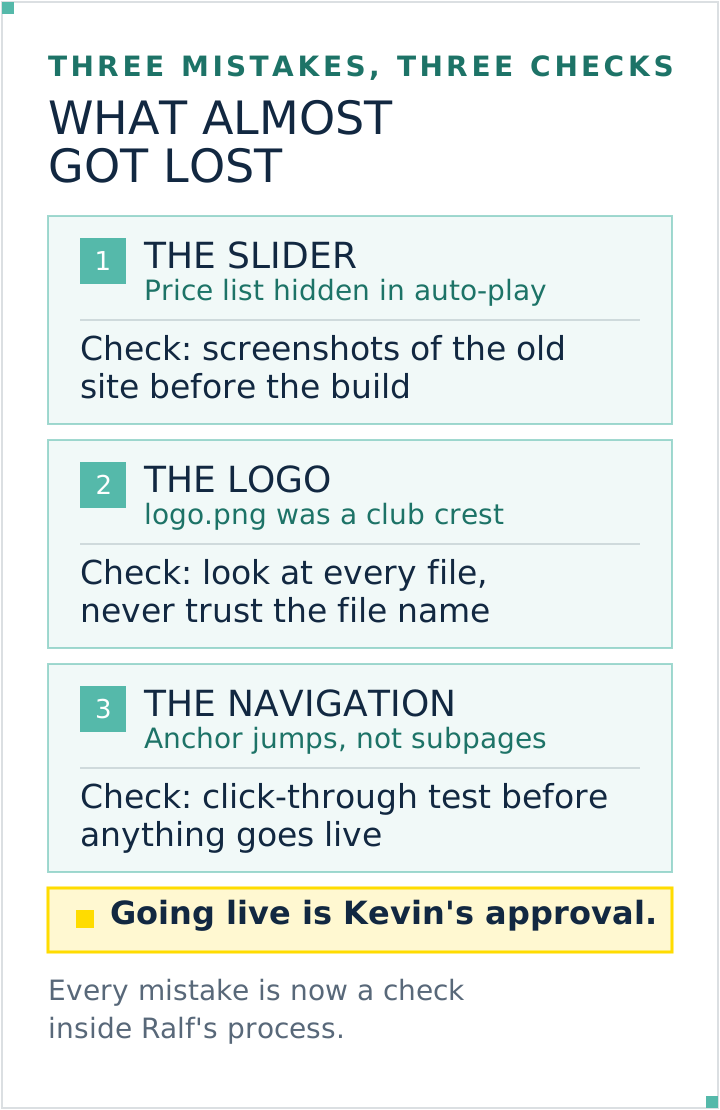
This is exactly where the expensive mistakes are made. Three of them happened to me in my own projects, and they have been fixed checkpoints in my stocktaking ever since. On one site the complete price list sat inside an auto-play slider, and two thirds of the offering would have been missing from the rebuild. In another project a file called logo.png turned out to be a club crest, not the company logo. And a navigation built on anchor jumps instead of real subpages would have made pages unreachable in the rebuild, because those supposed subpages technically never existed. None of these three traps is visible at a glance, and none of them occurs to an AI on its own.
Step 2: Decide what stays and what goes
Now the inventory is on the table and gets sorted. Four buckets are enough:
Bucket
What belongs in it
What follows from it
Stays
pages that bring enquiries, get found or are linked to
keep the content, keep the address unchanged where possible
Gets merged
several thin pages on the same topic
one strong new section, all old addresses point to it
Gets replaced
outdated content that is still needed
new text, old address points to the new version
Goes
last year's campaigns, empty pages, duplicates
redirect only to a genuinely matching replacement; otherwise return a deliberate 404 or 410
The key sentence for this step: the business makes this call, not the tool. An AI sees that a page is short and rarely visited. It does not see that this exact page brings the three jobs a year the business lives on. Hand the sorting to a tool and you get a tidy website while losing the pages that earned the money.
What lands in the "goes" bucket still gets a clear technical decision: a matching redirect or a deliberate 404/410. A loosely related destination chosen only to avoid an error is not a good replacement.
Step 3: Rebuild along the structure, not along taste
Only now does the building start, and in this order: structure, then content, then design. The structure is the page plan with its heading levels, meaning the question of what somebody reads in which order. Start with the colour and you will still be arguing about colours weeks later while the layout was never settled.
Three checks belong before going live, and you can run them yourself:
Phone first. Click through the site on a real phone, not in a shrunken browser window. Fill in the form, tap the phone number, open the map.
Click test across every page. Touch every link once. Dead links to deleted subpages are the most common fault right after a rebuild.
Compare against the old site, section by section. Not "looks complete", but list against list. That is exactly what the stocktaking from step 1 is for.
In my own rebuilds this part runs automatically: the build uses Node.js and Next.js, the screenshots of the old site and the pre-launch click test run through Playwright, and the rollout goes to my own Kubernetes cluster. For a business self-build you need a hosting plan that permits that use; Vercel's free Hobby plan is reserved for personal, non-commercial projects. For a classic website without your own server, Web Hosting Comparison: Prices, Space, SFTP compares the plans after the promotional period.
Step 4: Redirect the old addresses
This is the step missing from almost every guide. A matching redirect tells browsers and search engines that a page has moved. Overall visibility also depends on content, internal links, rendering, canonicals, robots rules, sitemaps, performance and changed search intent.
How to do it cleanly:
Build a table: old address, new address. For every single address from step 1, including images and PDFs that are linked elsewhere.
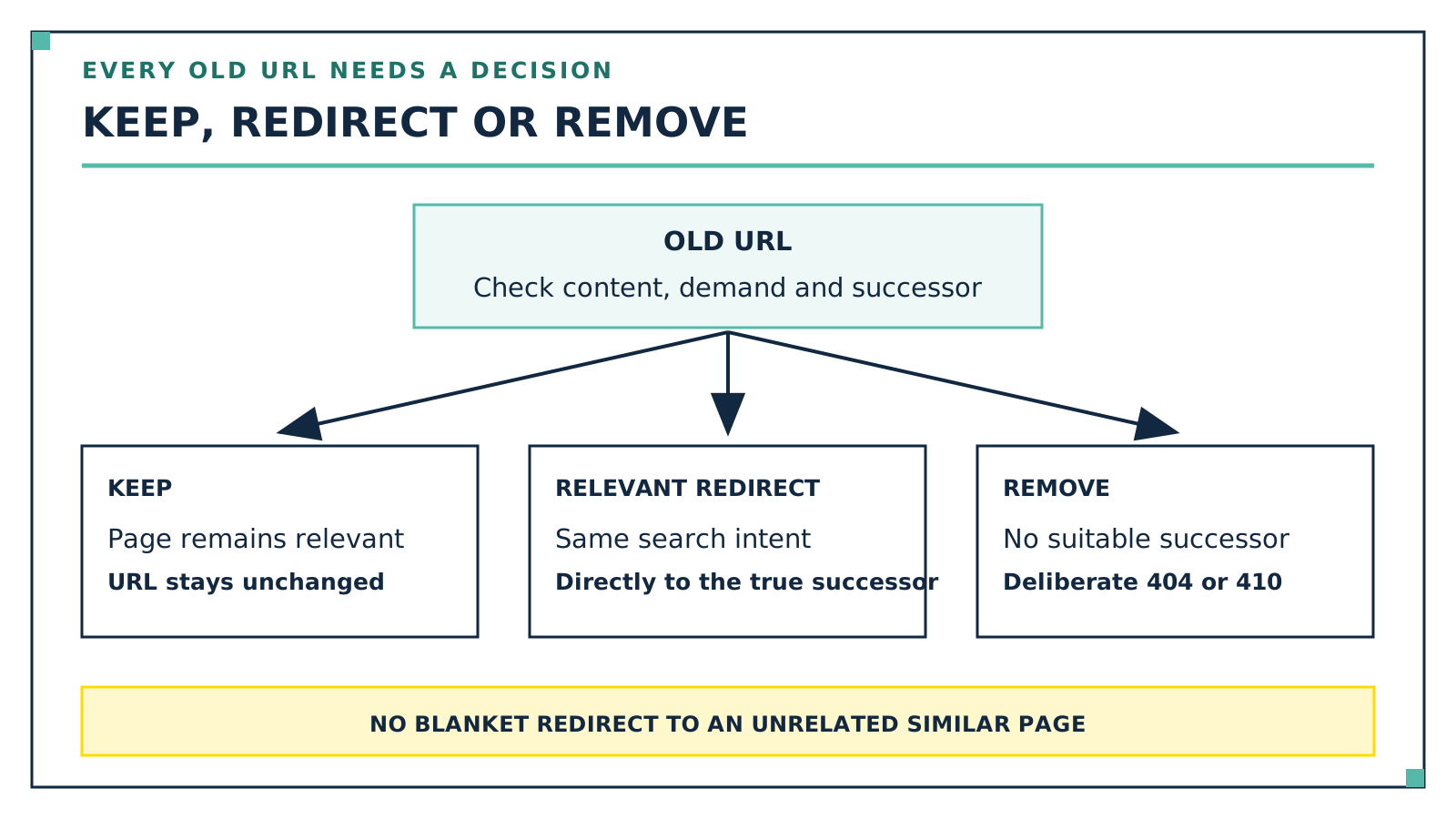
Redirect permanently, not temporarily. Google puts it like this: with a permanent redirect, meaning 301 or 308, Googlebot follows the redirect and the indexing pipeline uses it as a signal that the target should be canonical. With a temporary redirect (302, 303, 307) Googlebot follows it too, but does not use it as that signal.
Do it server-side. Google explicitly recommends server-side redirects and names JavaScript redirects as the last resort when nothing else is possible.
Target the matching page, not the homepage. Pushing everything to the homepage throws the topical match away.
No chains. Google advises avoiding chains of more than three to five hops, because they slow down loading. Old address straight to the final new address, not via two stopovers.
Leave them in place for a long time. Google's site move guidance says to keep redirects for as long as possible, generally at least one year.
Submit a new sitemap and watch. After the rebuild, submit the new sitemap in Google Search Console and observe: the number of indexed addresses from the old list drops while the new one rises. Google describes exactly this as the expected pattern.
One special case that gets confused a lot: if only the addresses within the same domain change, you do not need a move notification, you need redirects and an updated sitemap. The Change of Address tool in Search Console is meant solely for moving to a different domain, works only at domain level, requires both properties to be verified, and its effect lasts 180 days. The redirects themselves should still stay up longer, as long as visitors still arrive through them from search.
Every old URL gets a deliberate decision: keep it, redirect it to a true replacement or remove it. Graphic: Kevin Welter
Why a modernization without this step costs you visitors
An old website has built up something over the years that does not come along to the new build unless you actively carry it over: it sits in search results, in directories, in bookmarks, in email signatures, in other people's posts. All of those references point at addresses, not at content. Once the address is invalid, every one of those paths lands on an error page.
The loss does not happen on launch day, it creeps in, and that is what makes it treacherous. The homepage works, the business sees a nice new website, and the fact that the service page which used to bring the enquiries now leads nowhere only gets noticed weeks later, in the number of enquiries.
That is why the redirect table does not belong at the end of the project but inside the stocktaking: it starts in step 1 as the column "old address" and gains the column "new address" in step 2. Then it is finished on launch day instead of being improvised the night before.
Where AI really helps and where it doesn't
Task
What AI delivers here
Taking stock and structuring it
Very strong. Fetching every page, pulling out texts and images, ordering headings, finding duplicates: that is blunt, exhaustive work, and this is exactly where it is fast and tireless.
Rewriting texts
Strong, as long as the statement comes from the existing material. Shortening, structuring, turning a wall of text into a readable page.
Rebuilding and making it mobile-friendly
Strong. A modern version comes out of a recorded structure quickly, and corrections are cheap.
Preparing the redirect table
Strong as groundwork: collecting old addresses, proposing matches. The matching still gets read before it counts.
Deciding which page matters
Not its job. Only the business knows what counts commercially.
Filling in missing content
Explicitly not. A service, a price or a review that was not on the old site must not come into existence.
That last point is where modernization and generator part ways. An AI website generator builds a plausible page from a short description, and whatever it does not know it fills in with something plausible. On an existing website that is a factual error with consequences, because invented services and prices then sit on your real site. The right answer to a gap is a placeholder in the draft and a line in the report, not a nice-sounding sentence.
An AI employee who keeps to this order
In my business this exact process is handled by Ralf, an AI employee with a single job. He gets the address of an outdated website and delivers a modern version from it in one go, one that works on a phone: all content from the old site carried over, better structured, online as a demo on request. He has built more than 20 client websites that way, and he also ships this website here himself.
The rules he works by are the same as above: he invents no services, no prices, no reviews, everything comes from the old website or the briefing, and whatever is missing he marks as a placeholder. Without source material he does not build: if the old address is dead he searches for it himself, and if he finds nothing he asks. He prepares the launch fully, and I flip the switch. And he does not check only himself: a second AI employee reads his briefings against the source, and in the first cross-check he found errors in four out of ten briefings. How he works and where I explicitly hold him back is on Build a Website With AI: How Ralf Works.
What he does not take off anyone's hands is the decision from step 2: which page stays and which goes is up to the business. Ralf takes on the legwork before and the building after, and in practice that is the bigger part. For therapy practices, advertising rules come on top; what that means for the copy is in Marketing for Therapists: Rules and Tactics.
Three concrete mistakes became fixed checks for every relaunch. Graphic: Kevin Welter
Frequently asked questions
Is modernizing worth it, or should I rebuild from scratch?
Modernizing pays off as soon as the old site already gets found or is linked to, because that substance comes with you. Starting over is the more honest answer when the business, the name or the services have fundamentally changed. The difference lies less in the building work than in whether there is any substance to preserve.
What happens to my Google visibility when I rebuild?
Redirects are important, but not a guarantee. Permanently redirect old addresses that have a genuine new counterpart; content removed without replacement can return a clean 404 or 410. Also check content, internal links, canonicals, robots rules, sitemaps, rendering and performance, and measure before and after launch.
How long do the redirects have to stay in place?
For a site move with URL changes, Google recommends keeping redirects for as long as possible, generally at least one year. When moving to a different domain, the Change of Address tool in Search Console only works for 180 days, and the redirects should keep running afterwards as long as visitors still come through them. How to check redirects, links and updates on a fixed rhythm afterwards is in Website Maintenance: Tasks, Checklist, Cost.
Can I modernize my website with AI myself?
Yes, and the building is the easier part. The effort sits in the stocktaking and in the redirect table, both legwork you cannot skip. Do both properly and an AI tool gets you surprisingly far. Skip both and you get a pretty site that does less than the old one.
What if the old site has barely any usable content left?
Then the modernization becomes a new build, and that is fine as long as it is said out loud. What stays true is that every old address needs a decision: redirect where there is a matching replacement, otherwise return 404 or 410. Gaps are answered by the business, not filled in by a tool.
What to do next
Don't start with the design, start with a two-column table: on the left every address of your current website, on the right nothing yet. You get the addresses from your sitemap, from your analytics, and by clicking through your own site once in full. That table is your stocktaking, your basis for decisions and, in the end, your redirect list all at once. Everything else, structure, texts, design, builds on it. And if you want an AI employee at your side who keeps to this order by himself: Ralf and the other ready-made roles are there to load in my community AI Employee Framework.
Kevin Welter
Developer, IT architect, author of technical books (Kubernetes, cloud infrastructures) and speaker. Runs his business with an AI workforce of fifteen AI employees and shows solo business owners in his community how to hire their first AI employee.