Lead Scraping Tools Compared
Official interface, bought database or platform harvesting: the three groups of lead tools, what each one binds you to contractually, who carries the risk.
Read the articleSeptember 16, 2026 · 19 min read
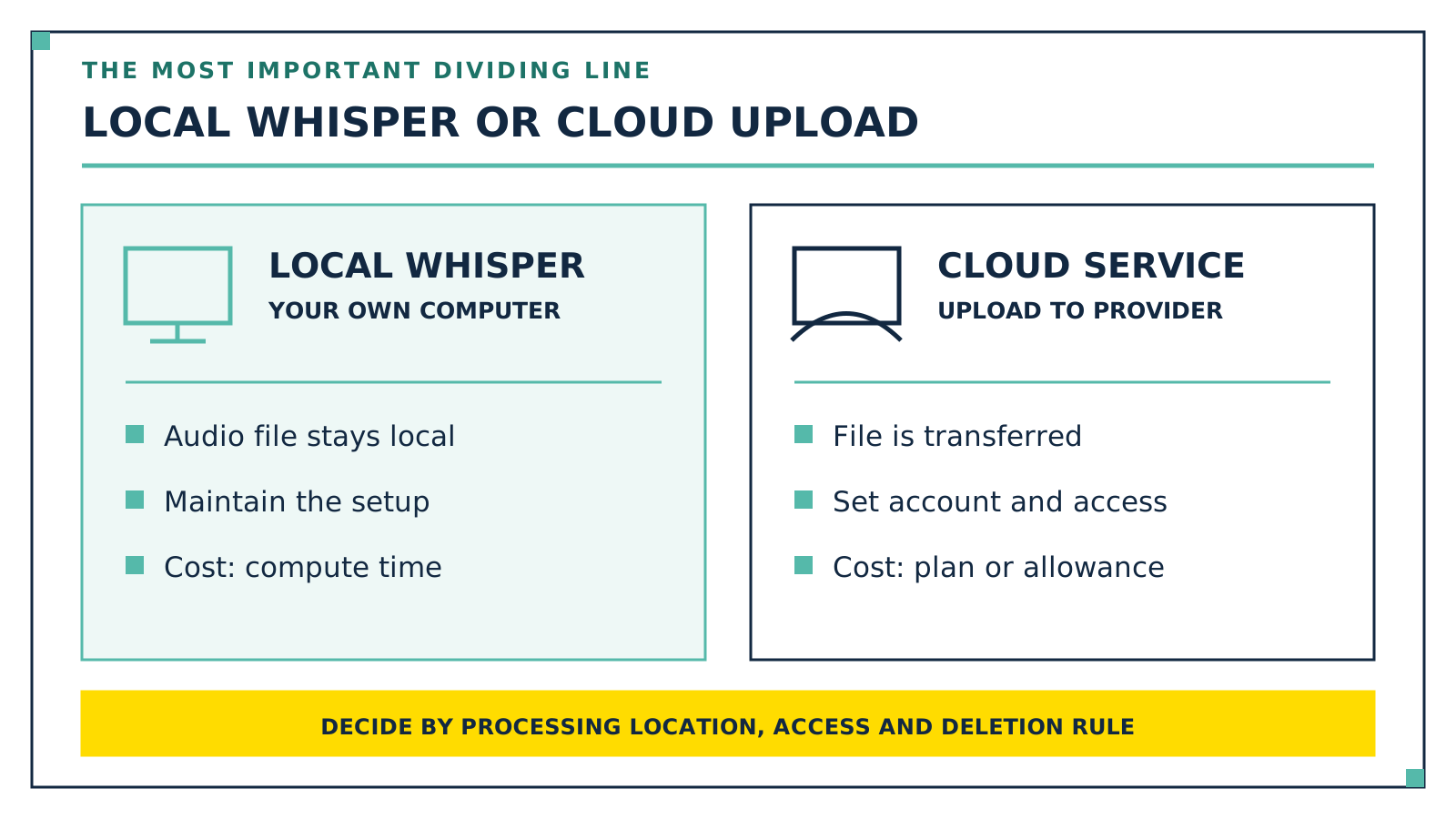
Transcription software for German-language recordings splits into two groups, and the dividing line isn't expensive versus cheap, it's local processing versus cloud. Running locally: Whisper on your own machine, noScribe and MacWhisper. The audio file never leaves your computer, there are no recurring costs, and you pay in compute time and a bit of setup. Running in the cloud: f4x with servers in Germany only, Amberscript with storage in Frankfurt, Happy Scribe in the EU, Descript with no named region, and OpenAI's Speech-to-Text API from $0.003 per audio minute. Underneath it is often the same model family, namely Whisper, which still doesn't mean the same result. Speaker separation ships with noScribe, f4x, Amberscript and Happy Scribe, is missing from plain Whisper, and sits in MacWhisper's Pro tier. For technical terms, Amberscript has its own dictionary, the OpenAI API has prompt and keywords, and Descript has a glossary that works in English only. Prices run from nothing to roughly twelve euros per hour of audio. So if you transcribe conversations with clients, patients or employees, you decide about the processing location first and about accuracy second.
I transcribe my own calls locally with Whisper. How I hand work to fixed roles instead of to an ever-growing pile of subscriptions is on the AI employees page, and what data goes anywhere near AI in my business is in AI and Privacy: What the AI Gets to See.
With most tools you pick a feature set, here you pick a legal relationship.
If recognition runs locally, the number of external recipients drops to zero, as long as no third party really is involved in the processing: no data processing agreement, no third-country transfer, no retention period at a vendor. That condition is the actual work. A cloud backup, a synced folder, telemetry, a managed device, a support session or a cloud model you switch on bring the third party back; MacWhisper, for instance, can hand transcription off to OpenAI, ElevenLabs, Deepgram, Groq or Gladia. Even purely local, legal basis, purpose, access control, encryption, retention periods and data subject rights remain your job: local reduces the number of parties involved, it doesn't replace a privacy concept.
If the file goes to the cloud, that is processing of personal data by a service provider. Processing agreement, processing location and retention period are on the table before anyone talks about word error rates: a first coaching session routinely contains health information, a performance review contains assessments, a sales call contains the client's numbers.
The model underneath often comes from the same family: Whisper sits inside noScribe, inside MacWhisper, inside the OpenAI API, and according to Descript's security page also among its sub-processors. The same family does not mean the same recognition: model size, implementation, pre- and post-processing, prompts and added diarisation change the result, and which version a vendor runs is stated nowhere. It only becomes comparable with the same audio file down both routes.
Seven questions decide this: local or cloud, where the data sits and with whom, German and dialect, speaker separation, technical terms, formats, price. The first three are answered by this table, the rest by the next one. The tools serve interviews for a thesis just as well; what's meant here is the working day. All figures from the vendors' own pages, retrieved on 20 September 2026; location, certification and retention are vendor statements; an ISO certificate or an EU location does not by itself make your processing GDPR-compliant.
| Tool | Processing | Where the data sits | Price |
|---|---|---|---|
| Whisper, self-hosted | local, command line or whisper.cpp | your machine only | 0 euros, MIT licence |
| noScribe | local, app for Windows, macOS, Linux | your machine only | 0 euros, GPL-3.0 |
| MacWhisper | local on the Mac, cloud services optional | your Mac, as long as no cloud service is switched on | Free 0 euros, Pro 65 euros one-off, 54 euros per licence from 5 up |
| f4x | cloud | own servers in Germany, ISO 27001, recording deleted right away, transcript kept 28 days at most | 25.00 to 1,599.00 euros for 2 to 200 hours incl. VAT, 15 minutes free |
| Amberscript | cloud | Google Cloud Frankfurt according to the pricing page, ISO 27001 and 9001 | from 0.17 euros per minute, plans at 19/29/49 euros a month for 5/10/25 hours, 10 euros per hour without a plan |
| Happy Scribe | cloud | data centre in the EU, ISO 27001, AES-256 | paid annually 8.50 euros for 120 minutes, 19 for 600, 59 for 6,000, on a monthly plan 17, 29 and 89 euros, extra minute 0.20 euros |
| Descript | cloud | Amazon S3 or Google Cloud, no region named, sub-processors Rev and Whisper | Free 60 minutes a month, then $16 billed annually or $24 monthly for 10 media hours, 24/35 for 30, 50/65 for 40 |
| OpenAI Speech-to-Text API | cloud | at the vendor | gpt-4o-mini-transcribe $0.003 per minute, gpt-transcribe $0.0045, gpt-4o-transcribe, whisper-1 and diarization $0.006 each; per-minute figures are estimates, the 4o models bill by token |
One hour of audio costs about 18 cents through the cheapest API model, about 27 cents through gpt-transcribe, between 8.00 and 12.50 euros at f4x, and nothing locally beyond electricity and waiting time. That is not a quality spread, it shows what you are paying for: infrastructure, German servers, an editor, or none of it.
| Tool | German and dialect | Speaker separation | Technical terms | Formats |
|---|---|---|---|---|
| Whisper, self-hosted | 98 languages; per the model card, uneven performance across accents and dialects | not included | steerable through the prompt | txt, vtt, srt, tsv, json, jsonl |
| noScribe | around 60 languages; the developer says it handles dialects fairly well | yes, via pyannote | no glossary, correction in the editor | HTML for Word, text, WebVTT |
| MacWhisper | 100 languages, interface available in German | Pro, local models only on M-series Macs, otherwise ElevenLabs or Deepgram | custom models can be added | srt, vtt, csv, docx, pdf, Markdown, HTML |
| f4x | 48 languages (2026 release); vendor claims 60 percent faster on German interviews | yes, automatic | no glossary documented | docx, rtf, srt |
| Amberscript | more than 90 languages | yes, renameable in the editor | own dictionary, included in every plan per the pricing page | Word, TXT, JSON, VTT, SRT, EBU-STL |
| Happy Scribe | more than 150 languages | yes, automatic | correction in the editor, human proofreading from 1.75 euros per minute | subtitle and text formats |
| Descript | 25 languages including German per the pricing page, one per file | yes | glossary in English only, as is filler word detection | export from the editor, subtitle formats |
| OpenAI Speech-to-Text API | whisper-1 covers 98 languages | via gpt-4o-transcribe-diarize | prompt with up to 224 tokens, keywords on gpt-transcribe |
json, verbose json, text, vtt, srt, diarized JSON |
Two things stand out: speaker separation is missing precisely where everything else is cheapest, and terminology support is thin. A dictionary for German technical terms exists here only at Amberscript, Descript's glossary works in English, and with the API you steer through prompt and keywords.
Two vendors publish numbers: Amberscript over 90 percent accuracy automatically and over 99 percent with human proofreading, f4x under one percent failed speaker separations, mainly with difficult recording quality. Both are vendor claims, with no measurement method, no test material and no statement about whether German-language audio was involved. I have not found an independent comparative measurement of these eight products for German.
More useful is a ten-minute test of your own, and how far you get without committing to a purchase varies by tool: Whisper and noScribe are free, MacWhisper has a free version that transcribes, f4x gives 15 free minutes explicitly without a subscription and without payment details, Happy Scribe ten test minutes, Descript 60 minutes a month. Amberscript lists no free quota on its pricing page, so the test starts with the purchase, and the OpenAI API bills from the first minute. Six of the eight you can try freely, two only for money.
Use a typical recording rather than a studio one: your room, your microphone, your conversation partner, your vocabulary. Then count: errors in proper nouns, misattributed speaker changes, minutes spent correcting. The third number is the one that shows up at the end of the month. If you'd rather not run the round alone, bring it to the weekly live Q&A call in the community.
One property affects every Whisper-based tool: OpenAI's model card explicitly notes that the model can produce text that was never spoken and that it tends to repeat itself. At quiet passages a transcript therefore doesn't look patchy, it looks plausibly wrong. Proofreading is part of the job, not a quality aspiration.
In Germany, recording the non-publicly spoken word without authorisation is a criminal offence under § 201 StGB, not a regulatory offence. The safe rule for everyday business is therefore to obtain every participant's express consent in advance. Processing that recording with software afterwards is a separate matter and needs its own basis under the GDPR. Even the Whisper model card advises against using the model on recordings made without the consent of those involved. This isn't legal advice. The full version, with the statutes, the consent routes and the special case of recording employees, is in Transcribing Calls: What German Law Says.
prompt and keywords for technical terms, 25 megabytes per file maximum.If it isn't individual files but the minutes after every meeting, the route through your conferencing tool is often shorter. What that looks like in Teams, Zoom and Meet is in Automatic Meeting Minutes with AI.
If you don't want to convert finished recordings but dictate straight into any app via a keyboard shortcut, you need a dictation app rather than transcription software; Wispr Flow Alternatives Without Subscription gives an overview including local and free options.
Every tool comparison ends in the same place: you now have text, whether from your own software or because you had the transcript made. After thirty calls there are thirty files nobody reads again, and the question isn't which program produced them, it's who works through them.
In my business that role belongs to Gustav, my AI employee for call analysis. His speech recognition runs on local Whisper. Then comes the fixed substitution pass: names into roles, companies into industries, amounts into orders of magnitude, places into regions. That makes the text pseudonymous, not anonymous (Art. 4(5) GDPR). As a minimum check, the pass asks whether role, industry, timing and a quote together still point to a person. True anonymity under Recital 26 depends on the full context and on whether identification remains possible by means reasonably likely to be used. If in doubt, the entry stays pseudonymised and gets a purpose, a retention period and access control.
His output is therefore not the transcript but a pattern register: the recurring questions from many conversations, each paired with your own best answer, which is where playbooks, FAQ entries, content raw material and an objection library come from. How a role like that is built is in Hiring an AI Employee: The Process, and which roles carry weight in coaching is in AI for Coaches.
For confidential conversations noScribe is the first candidate: local, with speaker separation, free, but compute-heavy. If you want to install nothing and need German servers, look at f4x, which the vendor says is 60 percent faster on German-language interviews in its 2026 release. Recognition almost everywhere goes back to the Whisper family, which still doesn't mean the same result.
Yes, without a quota ceiling. Whisper is MIT-licensed, noScribe is GPL-3.0, both run free on your own machine. You pay in compute time: noScribe needs roughly one to three hours per hour of interview. The free tiers of the cloud services are capped: Descript 60 minutes a month, Happy Scribe ten. All the free routes and their allowances are in Convert Audio to Text for Free.
Not a question about the product, but about the setup. Local tools need no data processing agreement as long as no third party really is involved: no cloud backup, no cloud model switched on, no external support access. Legal basis, access control and retention periods remain your job regardless. For cloud services, check processing location, processing agreement and retention: f4x processes in Germany, Amberscript stores in Frankfurt, Happy Scribe in the EU, Descript names no region. An EU location and an ISO certificate are building blocks, not a certificate of compliance.
A strong candidate for sensitive material: free, open source under GPL-3.0, local, with speaker separation via pyannote, around 60 languages and an editor for proofreading. Output as HTML for Word, text or WebVTT. Watch the address, though: the developer warns about an unrelated vendor on a similar domain.
Run ten minutes of a typical recording of your own through two tools, one local, one from the cloud, and measure the time until you'd show the text to someone.
If the bottleneck isn't the software but the work that comes after it, Gustav sits ready as a package in my community, with the substitution pass and its check, consent templates and an invented demo transcript to practise on. How you'd put Gustav to work in your business is something we'll look at together. Everything about it is under Community.
Official interface, bought database or platform harvesting: the three groups of lead tools, what each one binds you to contractually, who carries the risk.
Read the articleSix task areas instead of feature lists: what Notion, Google Workspace, Bitrix24 and Nextcloud cover, what they cost, and how you get your data back out.
Read the article
Kevin Welter
Developer, IT architect, author of technical books (Kubernetes, cloud infrastructures) and speaker. Runs his business with an AI workforce of fifteen AI employees and shows solo business owners in his community how to hire their first AI employee.
Your first AI employee up and running within an hour
Join the community$5/month founding price, first 50 members