Can AI Write Emails in My Voice?
Yes, if you give it examples instead of adjectives. What your tone is made of, how to write it down, and how to spot an AI email right away.
Read the articleSeptember 18, 2026 · 15 min read
When creating quotes and invoices, an AI takes over four steps. First, it derives line items from the conversation: it reads your note or transcript and maps what the client described to the services you have stored. Second, it writes the wording, the cover text, the description per line item and the reference back to the conversation, in your tone rather than catalogue language. Third, it calculates the totals, net, VAT and gross, ideally with a calculation tool, so the result stays reproducible. Fourth, it checks for completeness: missing details, leftover placeholders, line items without a quantity, totals that do not match the list of items. Its limit sits in one place: it only knows your pricing logic if you have stored it, and it must not guess a price. That is why quality depends less on the model than on your service and price list. Without a maintained foundation you get quotes that look good and are wrong.
In my own business, services, prices and text blocks sit in one place instead of scattered across old quotes, and the draft is built from that. How the path from inbox to finished draft looks is in AI Agent for Bookkeeping and Inbox, the concept behind it on Hiring AI employees. This post stays on creating the document. What comes afterwards, reading receipts, proposing account assignments, reconciling payments, is covered in AI Bookkeeping: What Actually Works Today.
A conversation note turns into a list of items: which building block matches what the client described, in what quantity and unit. An AI can do this because it reads both, the free text and your structured service list. It maps, it does not invent. Whatever stayed open in the conversation stays open in the draft and belongs there as a flagged question, not as an assumption.
A quote that picks up the client's need in their own words reads differently from one straight out of the template, and that rewriting is what a language model is good at. The same applies per line item: a terse master entry becomes two sentences that fit the case. How a quote is structured overall is covered in How to Write a Quote That Convinces.
A language model should not do arithmetic freehand, it should use a tool. The reason is reproducibility: a total that has gone through a calculator or the invoicing software comes out the same on every run, and the way it got there stands as a call rather than only as a figure in the text. Anthropic describes this separation for tool use: the model decides which tool to call, and the call itself is executed outside the model (as of September 2026).
The underrated step. An AI can hold a draft against a checklist and report what is missing: a line item without a quantity, a placeholder from the template, a date left over from the last quote, a description that belongs to a different client. It can look at the finished PDF as an image and check it for line breaks and clipped special characters.
The hard limit is not the wording, it is the price. A language model knows language and what you give it, but not your costing. Anthropic describes this in the tool use documentation: if a required field is missing from a tool call, a model often recognises the gap and asks for it, but it may also infer a reasonable value, and that behaviour is explicitly not guaranteed (as of September 2026). A price is such a required field.
The most important setting on a quoting assistant is therefore not a style rule but a permission: it may say that it does not know. Anthropic lists this as the first countermeasure against invented content, alongside two others that fit just as well here: ground answers in the documents provided, with word-for-word quotes, and restrict the model explicitly to those documents instead of its world knowledge. The documentation adds: these techniques significantly reduce invented content but do not eliminate it entirely, and critical information still needs validating (as of September 2026).
What a price source can look like is readable off the interface of an invoicing program, because there it is formally defined. Lexware Office keeps services and products as articles that are used in the line items of quotes and invoices. Required fields when creating one are, per the API documentation, title, type, unit and price with its leading price type and tax rate (retrieved 20 September 2026).
| Field | What sits behind it | Why the AI needs it |
|---|---|---|
| Title | What the service is called | So that a topic from the call becomes a named line item |
| Type | Product or service | Decides the unit and the wording |
| Unit | Piece, hour, day, flat rate | No unit, no quantity, no total |
| Price | Net or gross, with a note which one leads | The only permitted source for the figure in the quote |
| Tax rate | the values of the field: 0, 7 or 19 percent | Determines how VAT is shown |
| Description | Two sentences about the service | Raw material for the line item text |
0, 7 and 19 percent are, per the documentation, the values this field has allowed since March 2024: that is the structure of the field, not an allocation for your case. Which rate belongs to which service, and how special cases are handled, you settle in your accounting system or with your tax adviser.
Add two columns the interface does not require and that make the difference in my own template: where the price comes from and since when it applies. That way an assistant names not only the price but also its source, and you spot outdated entries before they end up in a quote. If you would rather not build that list alone, bring your draft to the weekly live Q&A call in the community. What that looks like in a trade business, measurements, materials and labour, variations, is covered in Automating Quotes in the Trades.
An empty document forces you to look up every price. A quote that looks finished invites skimming, and the mistake then is not in the wording, where it would stand out, but in a number indistinguishable from the right ones.
Three patterns are close at hand. First, the price from general world knowledge: the model knows market rates for consulting, trades or websites and writes one of them down because yours is missing. Second, the averaged price, in a constructed example: if a day rate of 1,200 euros sits in this year's price list and 950 euros in an old quote, then 1,075 euros in the draft is evidenced nowhere and still looks professional. The right way would be to name both sources and ask which one applies. Third, the invented service: when a client asks for something you do not offer, a helpful assistant may still phrase it as a line item.
This distinction decides how much an AI may touch. With a quote you largely shape the content yourself, it is your declaration to the client, and how strongly it binds you is steered by the wording: under German law, whoever proposes a contract is bound by that proposal unless they excluded the binding effect (§ 145 BGB), and a cost estimate is not a price guarantee as long as you have not warranted its accuracy (§ 649 BGB). A binding proposal, a quote marked subject to change and a cost estimate are three different things, and which one you are writing is your decision, not the assistant's. What a validity date and a reservation do is covered in How to Write a Quote That Convinces.
With an invoice part of the content is prescribed, plus requirements for numbering and immutability that a word processor cannot deliver. What has to appear on an invoice if you are a German small business is covered in German Small Business Invoices: The Rules, and who owes which format from when is in German E-Invoicing: Dates and Exemptions.
In practice this means the invoice is created inside the invoicing tool, not as a loose PDF, and the AI works there in draft status. The Lexware documentation makes the difference visible. A voucher with the status "draft" is editable, a voucher with the status "open" counts as finalized and can no longer be changed (retrieved 20 September 2026). An assistant that creates contact, quote and invoice as drafts stays in the part that can be taken back. Finalizing remains a decision with consequences, and therefore yours. Which routes exist to connect an accounting tool, and what they require, is sorted out in Lexoffice Integration: The Main Routes.
To check the structure of a quote before your first AI draft, use Free Quote Template: Word, Excel, PDF; keep your service and price source alongside it.
A draft you do not review is not a time saving, it is a shift of liability onto you. Six points are usually enough:
Points one and two you cannot delegate. The rest can be pre-checked automatically.
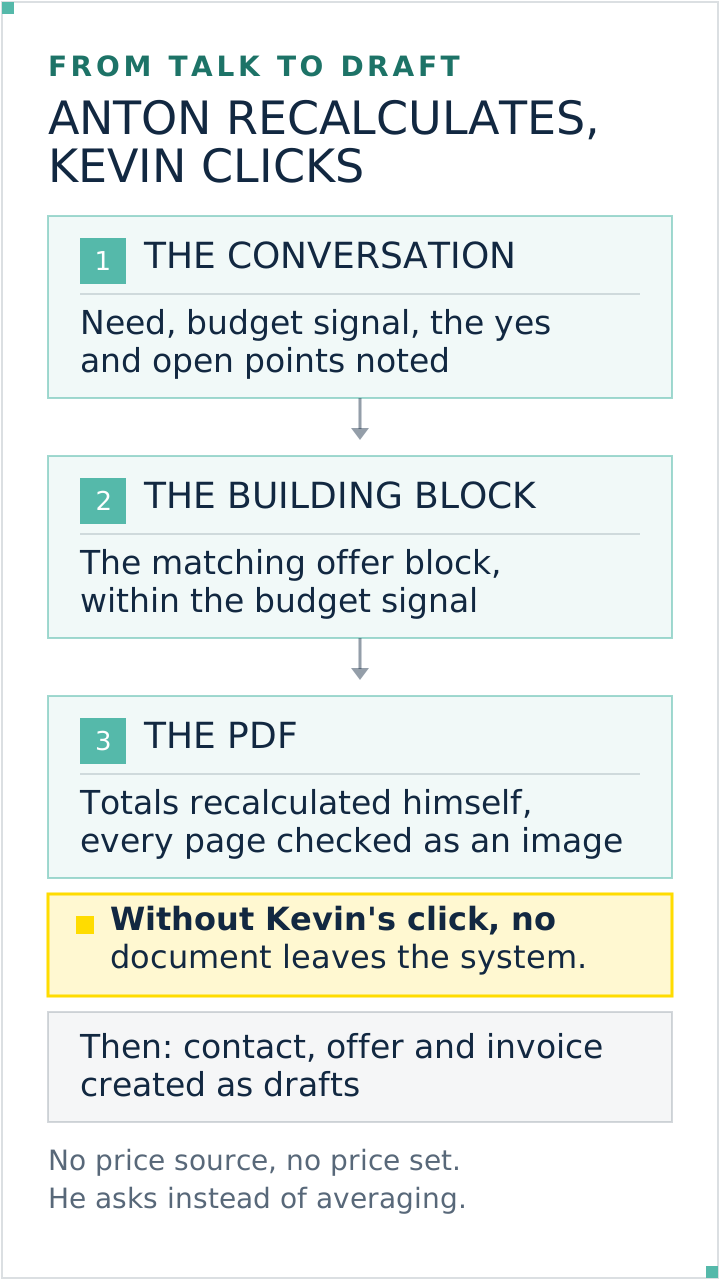
This is the sequence Anton, my AI employee for quotes and invoices takes over in my business. He is trained on 5 to 10 old quotes rather than on cobbled-together instructions, keeps an onboarding journal in which my feedback stays on record and is read into the next quote, and builds an offer PDF in my design from the reviewed conversation. He recalculates the totals and looks at the finished PDF page by page as an image. Once the client says yes, he creates contact, quote and invoice as drafts in the accounting tool. What an AI employee is, and how it differs from a chatbot, is explained in What Is an AI Employee?.
Two rules are hard-wired into his setup, and they are the reason I let him near quotes. He drafts, I approve: no quote and no invoice leaves the system without my click, and he never finalizes unprompted but names the consequences first and wants a clear yes. And: no price without a price source. If he finds two prices for the same service, he lists both with their source and asks. In the practice case from the course, trained on a fictional client, both show up in one place: the enquiry arrives with time pressure and an open budget, and instead of setting a price he proposes the questions that would supply it.
Yes, when it is trained and has a price source. It maps stored services to the conversation, writes the wording, calculates the totals and checks the draft for gaps. It knows your costing exactly as far as you have stored it: it writes language freely, prices never.
It can create the invoice as a draft in the invoicing program, with line items, quantities and amounts from the accepted quote. The sequential number and the immutability come from the program, not from the AI. Finalizing happens after explicit approval, because a finalized voucher can no longer be changed in many systems.
The question usually comes too early. What matters first is whether services, units, prices and tax rates sit maintained in one place, because the tool works from that. After that it comes down to whether your invoicing program has an interface that can create drafts, and whether your plan includes it.
The calculation becomes reliable when a calculation tool executes it. The gain is reproducibility: the same call gives the same result, and the arithmetic is verifiable rather than sitting in the text as a figure. Hand the item list to a tool or to the invoicing program and you can check it at any time. Check the final sum against the item list anyway.
Then the assistant should name both sources and ask, because an average is evidenced nowhere and still looks professional. And once you have decided, the old entry comes out of the active price source or gets an end date, otherwise the same question is back with the next quote. That is what the validity date column is for.
Technically yes, sensibly no. A concretely worded quote can bind you legally, and whether and for how long depends on its content, its validity date and any reservations. An invoice becomes an accounting record. Both belong on your desk before they go out. The time saving sits in the draft, not in the approval. None of this is legal or tax advice.
Build the price source first, everything else after. Open a table and enter six columns per service: title, type, unit, price, tax rate and the source with a date, not for the whole catalogue but for the services from your last ten quotes. Then the test: have a draft built for a job you have already completed and put it next to the quote you sent back then. Every deviation shows a gap in your list or a place where something was guessed, and you want to know about both before a quote goes to a real client. If something gets stuck, a question in a post or in the next call usually settles it faster than a third attempt alone.
If you want the finished quoting and invoicing employee with the course instead of building him from scratch, you will find him in my community AI Employee Framework. And if you want to sort out first which tasks in your business suit handing over, Which Tasks You Can Hand Off to AI helps.
Yes, if you give it examples instead of adjectives. What your tone is made of, how to write it down, and how to spot an AI email right away.
Read the articleWhat Copilot, Gemini, Apple Mail, Superhuman and a plain chat window actually do for email: context, tone, draft or send, where the data sits, and price.
Read the article
Kevin Welter
Developer, IT architect, author of technical books (Kubernetes, cloud infrastructures) and speaker. Runs his business with an AI workforce of fifteen AI employees and shows solo business owners in his community how to hire their first AI employee.
Your first AI employee up and running within an hour
Join the community$5/month founding price, first 50 members