AI for dentists comes in three kinds: clinical software that flags findings on X-rays, AI scribes that draft visit notes, and AI for the office. This page is about the third, the office around the chair: sorting the practice inbox and drafting replies, preparing expense receipts, maintaining your website, drafting posts and replies to reviews. These jobs go to AI employees: AI roles with a fixed job, their own rules and your approval before anything leaves the practice. Diagnosis, treatment and every decision about a patient stay with you, and patient information never goes into a cloud service without the right agreement in place. The roles on this page run in my own business.
This is not legal advice. The legal points refer to the US HIPAA rules and the ADA Code of Ethics as of November 2026; your state dental board may add its own rules. Other industries are collected on AI by industry.
Three kinds of AI in a dental practice
Most of what you find under "AI dental" is clinical: software that flags possible findings on radiographs, or tools for treatment planning. That's a question of regulatory status, evidence and your clinical judgment. AI scribes that draft notes from the visit are the second kind; they handle protected health information directly, so the HIPAA rules below come first.
The third kind is less exciting and useful sooner: AI for the office. It needs clear rules about which data it may see.
Where the dental office eats your time
The office work arrives in small pieces:
Practice inbox: lab questions, supply offers, notices from your state association, equipment maintenance, CE offers, invoices.
Phone: appointment requests and callbacks while the team is assisting.
Receipts: supplies, rent, software, equipment service, all headed for bookkeeping.
Website and visibility: stale service pages, wrong opening hours, a contact form that fails on phones.
Reviews and social media: replying to Google reviews, sharing job posts, posting regularly.
AI for dentists: which AI employee takes which office task
My business runs on an AI workforce of fifteen employees. Six of them fit a dental practice, plus one building block without its own AI employee:
Every row follows my own rule: the AI drafts, a human approves.
Practice inbox: Frieda
Frieda runs in my own business. She sorts the inbox into four piles, Now, Today, Can wait and Trash, plus a fifth for cases that need my judgment, and drafts replies. She has never sent anything on her own. By her instructions, sensitive folders are off-limits: personal matters, job applications, health and legal disputes.
For a dental practice, that means separating business mail from patient communication. Even "I lost a filling, do you have anything this week?" is health information. The business inbox with distributor, maintenance and vendor mail goes to the AI employee; lab messages that name a patient belong on the patient side. For patient messages it prepares templates that your team sends itself. How the pile system works day to day is in Sorting Your Inbox: The Pile System.
Receipts and bookkeeping: Peter
Peter has been running in my business since August 19, 2026. In my bookkeeping interface he screens new receipts, assigns each the correct receipt type, matches the credit card statement line by line and reports what doesn't add up. He follows a written process description and doesn't book entries.
In a dental practice, Peter only gets expense receipts without a patient on them: supplies, rent, software, equipment service, CE courses. He also checks vendor invoices and puts together the documents for your accountant. A lab invoice that names a patient and their crown shows treatment, so it's protected health information, as is every patient statement. Those stay in your practice management software. More in AI Bookkeeping: What Actually Works Today and Digital Receipt Filing That Holds Up.
Website, marketing and reviews: Ralf, Sebastian, Conny and Eddi
Ralf builds and modernizes websites and prepares the launch; approval stays with you. Sebastian is my AI employee for SEO, AI search and the blog. Conny writes hooks, scripts and captions; Eddi edits real footage and adds subtitles.
For a dental practice in the US, the ADA Principles of Ethics set the frame (with advisory opinions revised to October 2025). Section 5.F: "no dentist shall advertise or solicit patients in any form of communication, including via social media, in a manner that is false or misleading in any material respect." The advisory opinion on websites and SEO adds that dentists "have an ethical obligation to ensure that their web sites, like their other professional announcements, are truthful", and the one on social media treats advertising that "promises superior results" without evidence as misleading. An AI draft needs the same review as agency copy.
HIPAA applies to covered entities, and a health care provider is one if it "transmits any health information in electronic form in connection with a transaction covered by this subchapter", electronic insurance claims being the typical case for a dental office. The ADA Code puts it in ethical terms in Section 1.B: "Dentists are obliged to safeguard the confidentiality of patient records."
The rule for every vendor, AI included, is 45 CFR 164.502(e). A covered entity may let a business associate "create, receive, maintain, or transmit protected health information on its behalf" only if it "obtains satisfactory assurance that the business associate will appropriately safeguard the information", documented in a written contract: the business associate agreement (BAA).
For Claude, Anthropic's help center says (as of November 2026): Anthropic provides a BAA covering its HIPAA-ready services, "such as use of our first-party API, Claude in Microsoft Foundry, or Enterprise plans", and "Standard Claude Enterprise plans do not include BAA coverage without action from a Primary Owner." Enabling HIPAA alone doesn't bring Claude Code or Cowork under the BAA; that takes a separate HIPAA configuration by the Primary Owner. What Claude does with your data by plan is in Claude Privacy and GDPR: What Applies, and how I decide what an AI may see in AI and Privacy: What the AI Gets to See.
The data lock: pseudonymize before anything reaches Claude
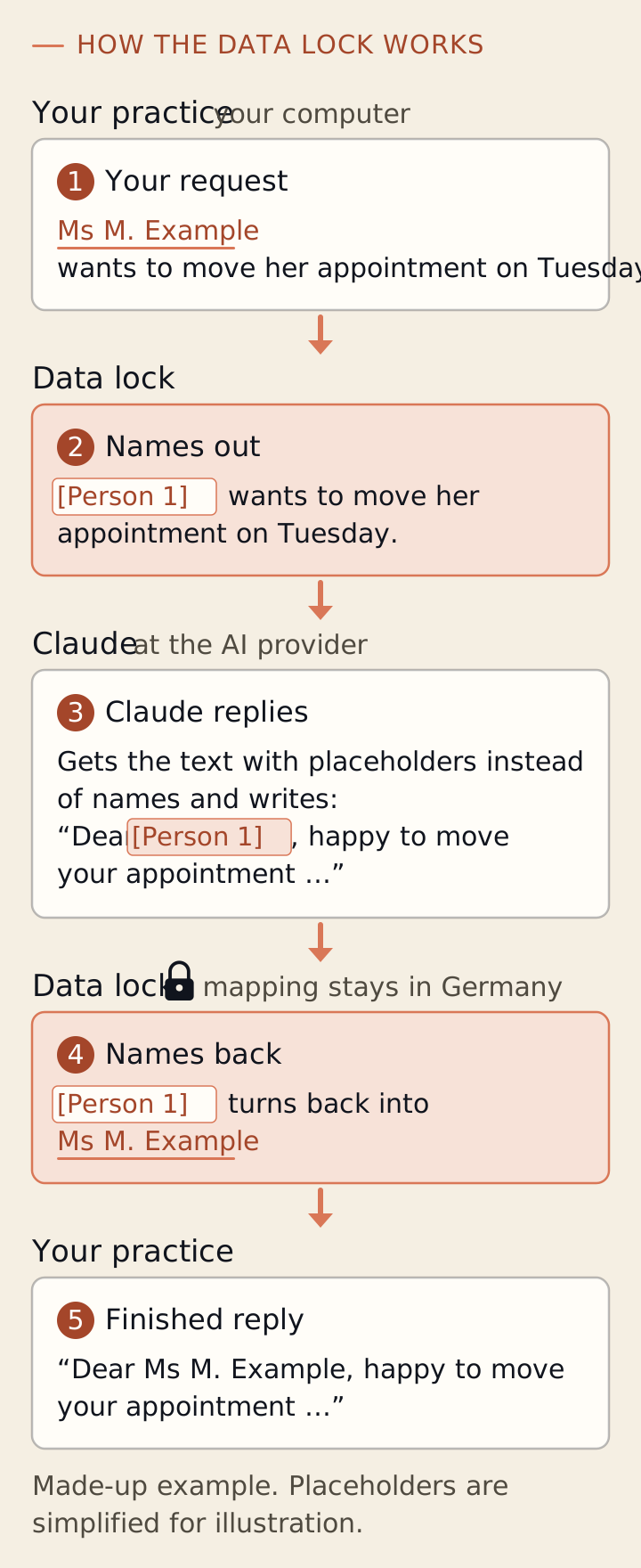
For practices that work with patient details, there's what I call the data lock. It sits between your team and Claude. Before a request goes to Claude, it replaces names and other details that point to a person with placeholders. Claude gets the placeholders instead of the names. When the answer comes back, the data lock puts the real names back in, and you read plain text. The list of which placeholder stands for whom stays on our server in Germany.
The principle of the data lock, shown with a made-up example and simplified placeholders. Graphic: Kevin Welter
The data lock is ready for use and already in operation. I set it up for each practice individually and tailor it to its work. For a US practice it doesn't replace the BAA that HIPAA requires, and pseudonymized is not de-identified. No automatic detection finds every detail, so some content shouldn't go to Claude at all. What your practice needs, we work out together in a call.
That's not what this page is about; here the AI does office work. Clinical AI for imaging or planning is a separate decision about evidence and your own judgment.
Can I paste patient information into an AI chat?
Not without protection. As a covered entity you need a BAA with any vendor that handles PHI for you, for the specific product you use. Without that, keep patient information out.
Do I have to switch practice management software to use AI?
No. Your practice management software stays the system of record for charts, scheduling and claims. The building blocks here work next to it.
Can I use the data lock in my practice?
For practices in Germany and the EU: yes, after a call. It's ready for use, and I set it up for each practice individually. For a US practice it isn't an answer to HIPAA.
How to keep going
Before any AI service sees data from your practice, work through the AI privacy check: five yes-or-no questions and a 20-point checklist. It's built on the GDPR and the EU AI Act, not HIPAA, but its core question carries over: which data goes where, under which agreement. Then note for one week which office work needs no patient data. The task that costs your team the most time is your first AI employee. To look at it together, book a first call: in 20 minutes we look at the one workflow that depends on you the most and work out your first step.
Kevin Welter
Developer, IT architect, author of technical books (Kubernetes, cloud infrastructures) and speaker. Runs his business with an AI workforce of fifteen AI employees and shows solo business owners in his community how to hire their first AI employee.