Creating Meta Ads With AI: A Guide
Creating Meta ads with AI: what Advantage+ generates inside Ads Manager, what an outside AI does before that, and which calls stay with you.
Read the articleSeptember 20, 2026 · 16 min read
Running ads on Meta means filling in three levels and avoiding unnecessary changes afterwards. At campaign level you choose the objective and optionally the campaign budget. At ad set level sit audience, placements, schedule and, when no campaign budget is used, the ad set budget. At ad level sit format, image or video, text, headline, link and identity. Review begins after publishing, usually within 24 hours according to Meta, followed by the learning phase. Leave optimisation changes alone where possible. Broken tracking, wrong landing pages, rejected ads, legal or brand risks and agreed spend or loss limits require an immediate stop or correction.
I run my business with a workforce of AI employees, each with their own role and their own personnel file. One of them, Susi, does nothing but Meta ads, and the workflow below is the one she works in. If you want to see the whole team: My AI Workforce. Everything on the topic lives on the AI employees page.
Meta itself describes ad creation in Ads Manager as three levels. A campaign holds one or more ad sets, and each ad set holds one or more ads. Once you carry that hierarchy in your head, you stop looking for settings in the wrong place.
| Level | What you set here |
|---|---|
| Campaign | Objective and buying type, optionally the campaign budget. Most advertisers use the auction buying type so Meta optimises delivery automatically. |
| Ad set | Audience (demographics, interests, behaviours, custom audiences), placements, budget and schedule with start and end date |
| Ad | Ad format (single image or video, carousel, collection), the creative itself with image, video, text, headline and link, plus the identity: Facebook page and Instagram account |
From this follows the most important build rule: whatever you want to observe separately later has to be set up separately now. Two ads produce two reporting rows, but not yet a causal comparison because Meta may distribute reach, audience and budget differently. For robust learning, use the A/B test with a hypothesis, equal budget logic and non-overlapping segments.
Meta has consolidated the older objectives into six simplified ones. You pick exactly one per campaign.
| Objective | What Meta intends it for |
|---|---|
| Awareness | Reaching people who are most likely to remember your ad |
| Traffic | Sending people to an online destination: website, app, page or shop |
| Engagement | Reaching people more likely to interact, for example by sending a message |
| Leads | Capturing leads through messages, calls or sign-ups |
| App promotion | Installs or specific actions inside your app |
| Sales | Reaching people most likely to buy |
What matters is what hangs off that choice. The objective determines which conversion locations and optimisation events you can set afterwards, which placements and formats are supported, and how much control you keep over targeting: if you optimise for link clicks, landing page views, conversations, conversions, app events, app installs or value, Meta's help centre says Advantage+ detailed targeting is applied automatically and cannot be switched off. Your interests and behaviours are suggestions then, not limits.
So the objective is not a formality at the start, it is the switch point. Think from the result backwards: which human action actually moves your business? That action is your optimisation event, and the objective follows from it, not the other way round.
This is the level where you decide who sees the ad. Few hard limits remain to you, essentially location, minimum age, language and exclusions. Everything else is a signal that Meta's delivery draws its own conclusions from. How to do the groundwork for that, describing people in their own words instead of in interest categories, is covered in Audience Analysis for Ads: A Guide.
With placements you decide whether Meta may look across Facebook, Instagram, Messenger, WhatsApp and the Audience Network or whether you pick yourself. The schedule holds your start and end date, and dayparting is tied to certain budget types.
Nobody who does not know your offer and your margin can tell you which number is right for you. You should still understand the mechanics, otherwise the billing will surprise you.
A daily budget is, according to Meta, an average rather than a spending cap: the amount you want to spend per day across a calendar week from Sunday to Saturday. On days with better opportunities Meta spends up to 75 per cent more and less on others. Meta names the ceilings explicitly: at most 175 per cent on a single day and at most seven times the daily budget across the week. A lifetime budget is the amount for the entire run and is subject to a fixed spending cap. That is the choice when a total amount must not be exceeded.
The Advantage+ campaign budget sits at campaign level. It is distributed continuously and in real time to the ad sets with the best opportunities, explicitly not evenly. Meta recommends it from two ad sets upwards and points out that results then have to be read at campaign level, not per ad set. If you need guardrails, set minimum and maximum spending limits per ad set, or assign budgets at ad set level and buy yourself control instead of automation.
What an AI can take off your hands in the steps before that, from Ad Library research to the text variations, is in Creating Meta Ads With AI: A Guide.
This is where most campaigns fail, and not because of a settings mistake but out of impatience.
First, review. It starts automatically as soon as you create or edit an ad and, according to Meta, usually runs within 24 hours. Among the things reviewed are images, video and text, the targeting information and the ad's destination.
Then the learning phase: the period in which the delivery system is still being trained on how best to deliver your ad set. The delivery column reads "Learning" during that time. It ends when performance stabilises, according to Meta normally after about 50 results in the week following your last significant edit. Meta's note on this is blunt: during the learning phase ad sets are less stable and carry a higher cost per result, and results from that period are not always a guide to later performance.
Which is exactly why daily fiddling is not optimisation but a reset. Meta lists what counts as a significant edit and pushes an ad set back into the learning phase:
With spending limits, bid and cost targets and the budget amount, it depends on the size of the change. Meta's own example: raising the budget from 100 to 101 US dollars is unlikely to trigger a new learning period, raising it from 100 to 1,000 US dollars probably will. Meta also writes in its best practices to avoid frequent budget changes, and puts the rule like this: only edit your ads or your ad set if you have reason to believe the change should improve performance.
On top of that comes the second effect almost nobody counts in: editing a scheduled or active ad or ad set at the targeting, the creative, the optimisation or the billing event triggers a fresh review. Changes to the bid amount, the budget or the schedule, according to Meta, do not.
A case of its own is the "Learning limited" label. It appears when an ad set is unlikely to reach around 50 optimisation events within a week of the last significant edit. Meta expressly calls this not a penalty but a sign that the budget is not being spent effectively. Typical causes: an audience that is too small, a budget that is too low, a bid or cost limit that is too low, too much auction overlap, an optimisation event that happens too rarely, or too many ads at once. The remedies follow from that: consolidate instead of splitting, widen the audience, or pick a more frequent optimisation event, for example "add to cart" instead of "purchase".
A test is not over when you get nervous. It is over when enough results have come in to carry a statement at all, and when the rule you set before the start applies.
The first indicator is the learning phase itself. As long as it says "Learning", you are reading numbers from an unstable period. Meta offers two columns in Ads Manager for this, "Last significant edit" and "Results". That is the most honest progress bar you have.
The second is the form of the test. For a real comparison of two copy variations that differ only in the promise, Meta provides the A/B test: each variation is shown to only one segment, nobody sees both, and a winner is determined at the end. Meta explicitly advises against testing informally by manually turning ad sets on and off, because that leads to inefficient delivery, overlapping audiences and unreliable results. What it recommends instead: write down a hypothesis beforehand, give both variations the same budget, and pick a test window in which enough reliable results can accumulate. How many results that takes is worked out in Conversion Rate Optimization: Steps and Tests.
The third is your own stop rule. It belongs before the start, not in the moment when the numbers start to hurt. Anyone who decides mid-flight when enough is enough is deciding by mood.
All of that build work is done by Susi, my AI employee for Meta ads. I give her a goal, community, webinar or retargeting, and get a complete campaign back: competitor research in the Ad Library, an audience map made of real audience words, copy following a fixed four-step, images as static HTML plus an AI image layer, and the campaign fully set up in the Meta account. If I'm promoting a Skool community specifically, the matching workflow for that is in Running Meta Ads to a Skool Community.
The difference sits in one word: every campaign the Meta ads connector creates starts out paused, enforced technically. Not as an agreement, not as good intentions, but as a state. Susi spends no money of her own. I take it live, and only after I have read the ad.
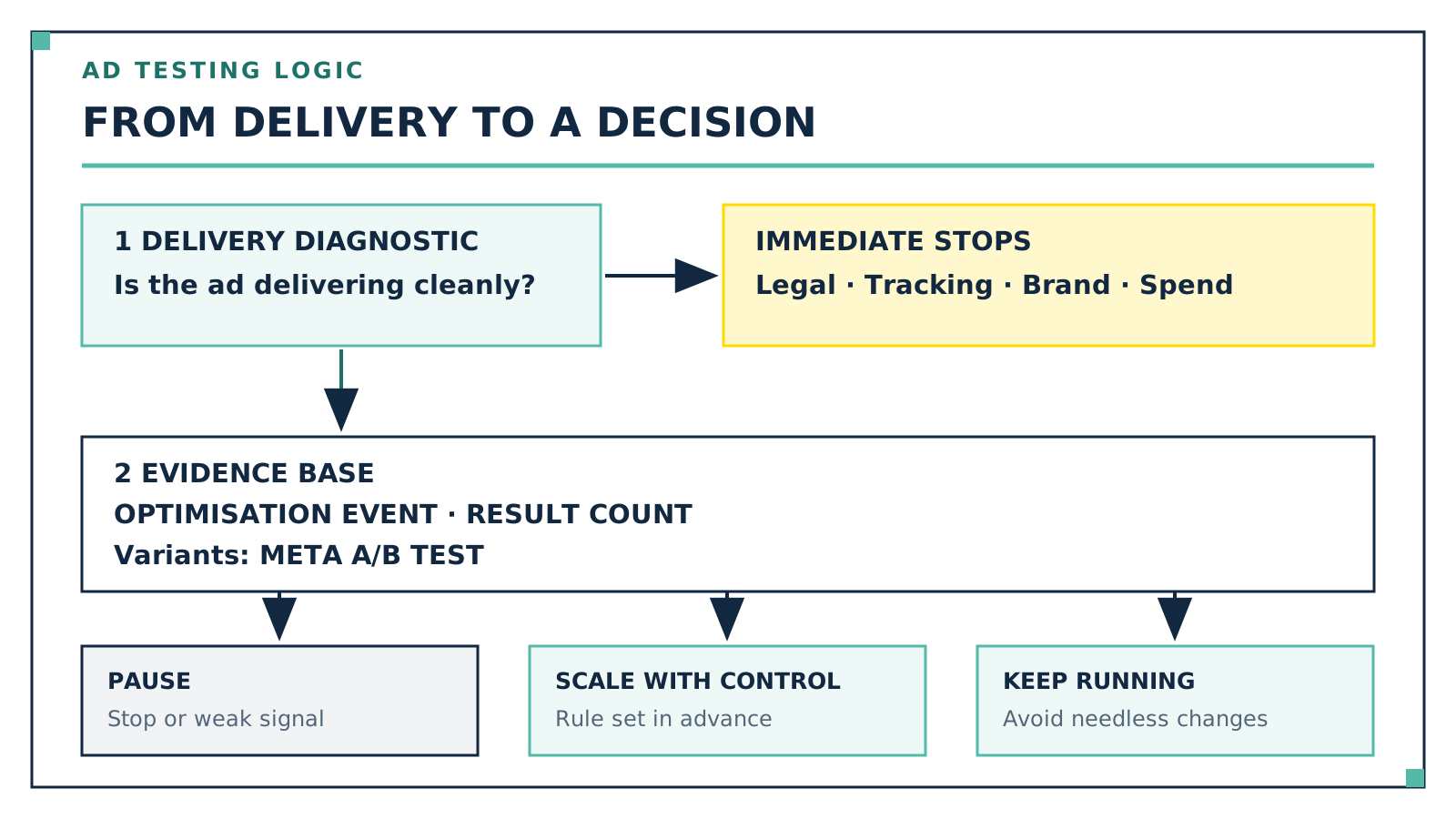
The evaluation follows rules set in advance rather than mood. Safety, legal, tracking and spend stops apply immediately. Three full days or 3,000 to 4,000 impressions are my minimum window for delivery diagnostics, not proof of enough conversions. The actual decision follows the predefined optimisation event, the result count and, for variants, Meta's A/B test. How to turn the result into a number that accounts for margin, returns and attribution windows is in ROAS Formula: Calculation and Worked Examples. Only then is the verdict kill, scale in a controlled way or keep running. Susi has worked this way since 17 July 2026 and has written dozens of reports.
Through Meta Ads Manager, in three levels: campaign with the objective and optional campaign budget, ad set with audience, placements, schedule and possibly its own budget, and ad with image, text and link. After review it can run if start time, payment and account are in order. Leave unnecessary optimisation changes alone, not real errors or limits.
Largely yes. Both run through the same Ads Manager and the same structure. The difference is in placements: at ad set level you decide whether the ad is delivered across Facebook, Instagram, Messenger, WhatsApp and the Audience Network or only in selected spots. The identity, meaning page and Instagram account, is set at ad level.
Review usually runs within 24 hours according to Meta, occasionally longer. If you set a start date, review begins right away but delivery only starts on that date. Important afterwards: every edit to targeting, creative, optimisation or the billing event triggers a fresh review.
Not according to a universal number of days or impressions. Define the minimum run, safety and spend stops, and the decision criterion for your optimisation event before launch. About 50 results in a week is Meta's learning-phase orientation; an A/B test also needs a hypothesis, equal budget logic and enough reliable results.
Sometimes. With the budget amount it depends on the size of the change according to Meta: raising it from 100 to 101 US dollars is named as uncritical, raising it from 100 to 1,000 US dollars as a likely trigger. The same goes for spending limits and for bid and cost targets, and frequent budget changes are to be avoided anyway.
Before your first campaign, write down two sentences: which action this campaign is meant to trigger, and when you will declare the test over. Those two sentences are worth more than any further setting in Ads Manager, because they take the decisions that would otherwise ambush you in the middle of the learning phase. If you want to make this a permanent role instead of doing it from scratch every time, Susi is available as a ready-made template in my community AI Employee Framework, along with the rest of the workforce.
Creating Meta ads with AI: what Advantage+ generates inside Ads Manager, what an outside AI does before that, and which calls stay with you.
Read the articleWhat a Meta ads agency costs: five billing models and the incentives they create, which costs sit outside the fee, and how to spot a weak proposal.
Read the article
Kevin Welter
Developer, IT architect, author of technical books (Kubernetes, cloud infrastructures) and speaker. Runs his business with an AI workforce of fifteen AI employees and shows solo business owners in his community how to hire their first AI employee.
Your first AI employee up and running within an hour
Join the community$5/month founding price, first 50 members