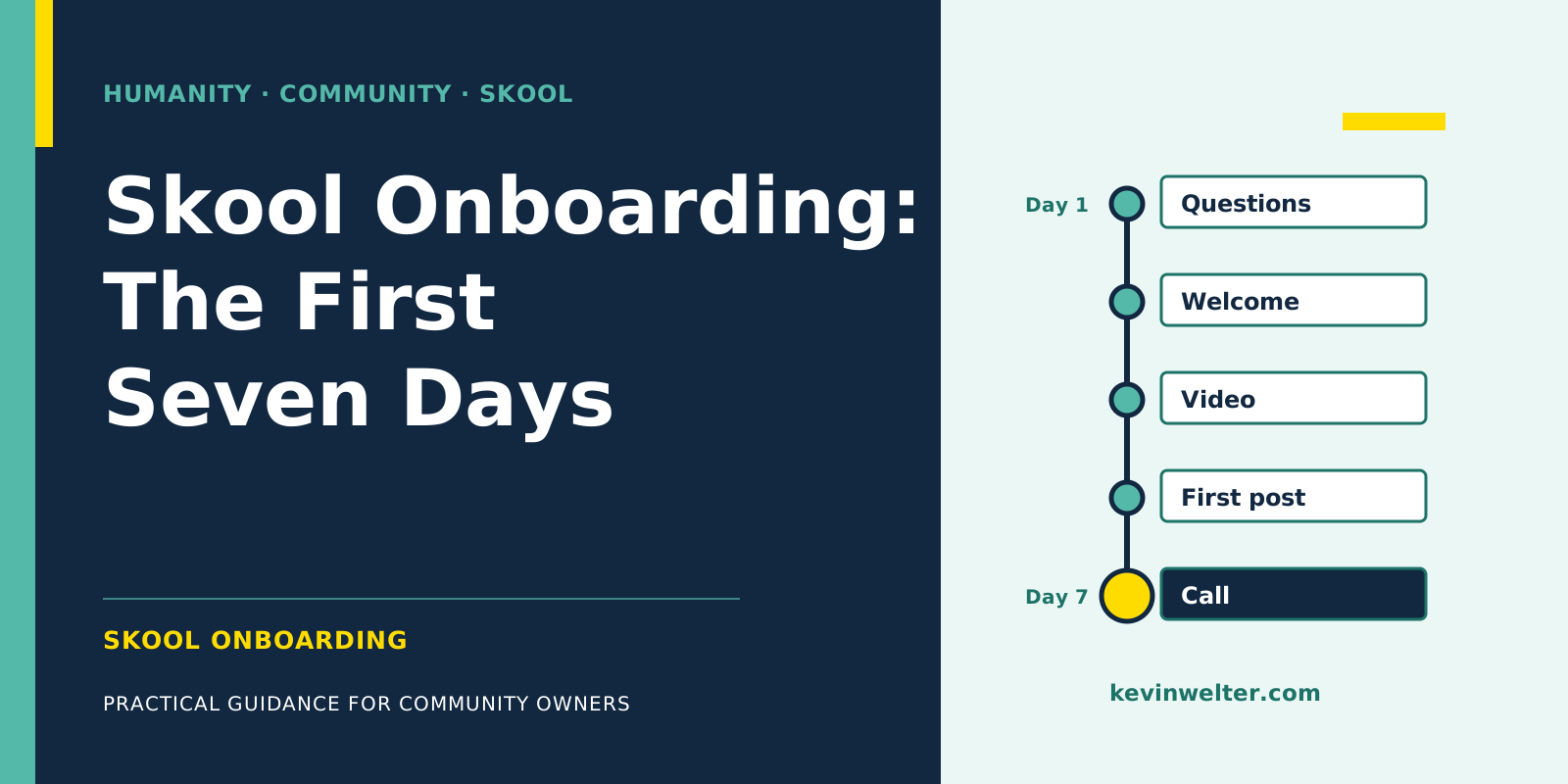
Skool onboarding is everything a new member experiences between the join request and their first result. In Skool you build it from five building blocks: the membership questions before joining, the automatic welcome message (AutoDM), the onboarding video, a pinned start post and the first live call. Membership questions are available on both plans; according to Skool's help center, AutoDM and the onboarding video are Pro only. Order matters more than quantity: each block should point to exactly one next step. And the first days deserve special attention, because in a client's community analysis we saw that buyers decide fast. That makes onboarding sales too, not just admin.
My own community, Claude Practitioners, runs on Skool, with three membership questions, the welcome DM switched on, a start post and a call every Thursday. The community runs in German. I share the preparation with two AI employees; the decisions stay with me. What that division of labour looks like across the whole community operation is in Community Management with AI Employees.
Why the first days are sales too, not just admin
For a coaching community from my client base, with a free and a paid area, we sorted and analysed the posts, comments and call transcripts available to us by buyers and non-buyers. Four patterns matter for onboarding:
- Buyers decide fast. Among active members, typically only a few days passed between first activity and purchase.
- A large share of buyers was never visibly active in the free area. You would not have spotted them from posts and comments alone.
- Buying decisions cluster on event days. Days with live events saw clearly more purchases than the days in between.
- Free members want guidance, not delegation. What they asked about was how to do things themselves.
The limits of the analysis belong here too: only active people were visible, and "buyer" was an approximation based on activity, not payment records. How such an analysis is built, and what you need in terms of consent and pseudonymisation, is in Buyer Persona with AI from Community Data.
My conclusion is a working hypothesis, not a guarantee: the first days decide more than the third week. Someone who gets rules, profile tips and categories explained is being administered. Someone who is shown how to reach their first result and when the next call is gets a reason to stay or upgrade. Whether your community starts free or paid only shifts the question slightly; the trade-offs are in Skool Community: Free or Paid?
Skool onboarding in seven days: the flow at a glance
The plan below is my suggestion, not a Skool standard. The features behind it are the ones Skool documents.
Between the stations, Skool sends its own emails according to the help center: a weekly digest with popular posts, a daily summary of unread likes, comments and mentions, and a reminder 24 hours before an event. Members can switch these off per group in their settings.
Skool membership questions: what to ask before people join
You can ask up to three questions, answered as a text box, multiple choice or email address; only one may ask for an email, and anyone who wants to join has to answer all of them. You set them up under SETTINGS > Plugins. Skool's rule of thumb: harder questions lower the conversion rate but bring better-matched members. For the third question, Skool itself suggests asking where people found you.
My three questions, translated from German:
- "What do you want to tackle with Claude first?"
- "Which AI tools do you have experience with?"
- "How did you hear about the community?"
The first question tells me where onboarding should start. The second shows the level. The third complements Skool's own source statistics, and that's not a detail: Skool attributes joins to the last touch. On the first documented purchase through my website, in September 2026, the path ran through Google search, my home page, a blog post and the Skool button; the answer to the question was "Google search". So the answer shows the start of the path, which Skool's last-touch attribution doesn't reflect.
According to the help center, you get the answers through the Export button on the Members tab (help article last updated March 2024). If you want to send them to a CRM continuously, use the official Zapier trigger "Answered Membership Questions", which is available on Pro only. More on the official connections is in Skool API and Automation: What Works.
The Skool welcome message via AutoDM
AutoDM is Skool's built-in welcome DM, available on Pro. According to the help center, it arrives one to five minutes after joining, can use the placeholders #NAME# and #GROUPNAME#, and the sender is a group admin. If a conversation between you already exists, Skool doesn't send the AutoDM. Skool itself advises asking one open and one closed question to start a conversation.
In my view, three things make a welcome message useful:
- One single next step. Not five links, but: "Start with the start post" or "The first lesson takes ten minutes".
- A nod to the membership question. If the first question asks about the goal, the message can respond to it in general terms, because according to the help center AutoDM only knows name and group name as placeholders.
- The next event. The call is the moment new members experience you.
For follow-up DMs on day two, three or five, Skool's help center describes no feature, only the AutoDM on joining. The platform policy prohibits bots that message others and rules out unsolicited messages to other members. So whatever comes after the AutoDM runs through posts, lessons and calls; personal messages you write yourself where there's a reason, such as a reply to the AutoDM.
The Skool onboarding video
The onboarding video is a Pro plugin. Skool describes it like this: welcome new members and show them a preview of how Skool works; you can also upload your own video. Skool itself recommends your own overview video showing where everything is. That's worth it because it shows your face and your order of things instead of a generic product tour.
An example of what to cover in two to three minutes: who you are, who the community is for, where the start post is, which lesson comes first and when the next call is. Nothing more. Everything else lives in the Classroom.
The first post: start post and introductions
You can pin up to three posts, and because Skool's default sorting is by engagement, a pinned start post is the most reliable place to begin. My welcome post for new members is called "New here? Your start in 10 minutes" (in German). On my community page the path is structured as hour 1, day 30 and day 90, and the quick start is designed so that your first own AI employee runs within the first hour. So the first hour has a concrete goal.
Check one setting: with the plugin "Unlock Posting at Level 2 or 3", new members can only post from level 2, which means after five likes on their own comments. That curbs spam, and Skool recommends it for large groups. According to Skool, new members can then introduce themselves by commenting on the pinned post; a separate introduction post on day one doesn't fit the lock. How levels and unlocks interact is in Skool Levels and Gamification That Work.
Ask concrete questions in the start post. My open poll "What has actually saved you time here?" got no answers; real success stories came unprompted, in posts about members' own wins. For the start post that means: rather a question new members can answer in one sentence than one they first have to think about. How such posts are drafted with AI is shown in Writing Skool Posts with AI, with Approval.
The first call
In the call, new members experience you live, which no automatic message can do. On the calendar you set up recurring events; Skool Call is included on both plans. In my community there is a coffee call every Thursday and a separate onboarding round. The analysis of my own coffee calls also showed me who actually shows up: not people curious about AI, but paying Claude users who aren't getting the most out of their subscription. Findings like that tell you where your onboarding should start: with what your members can't do yet, not with what they already have.
Schedule the first event so that a new member can reach it within their first week. If buying decisions cluster on event days, as in the client analysis, the call is also the place where the next tier of your offer may come up.
How Conny and Susi prepare onboarding for me
Texts are drafted by Conny, my AI editor in chief, such as the welcome message and announcements. She writes in my voice and invents nothing about me. Her new version of the welcome message is currently waiting for my approval, because what reaches new members is my decision.
The numbers are read by Susi, my AI employee for Meta ads. Besides the ads, she analyses the metrics Skool's admin dashboard shows for me: About page visits, joins, sources. She adds the answers to the membership questions. That way I see whether what people want first matches where my onboarding starts. What I change at the entrance is my call.
What of it appears in Skool is my decision. For your own setup I recommend: the AI drafts and analyses, and you take the step inside Skool yourself or through Skool's own features such as membership questions, AutoDM, the export of answers and Zapier. Skool's policies prohibit bots for posting and messaging and prohibit sharing login credentials, even with your own team. Where I deliberately depart from that for other tasks, and why, is in Skool API and Automation: What Works.
Frequently asked questions
What belongs in Skool onboarding?
Membership questions before joining, a welcome message via AutoDM, an onboarding video, a pinned start post, a first lesson and a first call. According to Skool, AutoDM and the onboarding video are Pro only; everything else is on Hobby too. What matters is that each block points to one single next step.
How many membership questions can I ask on Skool?
Up to three, as a text box, multiple choice or email address, with only one question allowed to ask for an email. Anyone who wants to join has to answer all of them. According to the help center, you export the answers on the Members tab; on Pro there is also a Zapier trigger that passes them on.
Can Skool send automatic messages after someone joins?
One: the AutoDM, one to five minutes after joining, on Pro only. Skool's help center doesn't describe a multi-day message sequence, and Skool's platform policy prohibits bots that message others. What comes afterwards runs through posts, time-released lessons and calls, or through messages you write yourself.
Do I need my own onboarding video?
Not necessarily. According to Skool, the plugin can show how Skool works, and you can upload your own video instead, which Skool itself recommends. Your own video of two to three minutes shows your face and your order of things: where to start, which lesson comes first, when the next call is. The plugin is available on Pro only.
How do I release content gradually in the first days?
Through the course access "Time unlock", which opens a course a set number of days after joining, or through Drip, which unlocks single pages after a number of days. Both are described in Skool's help center. That way a new member doesn't get everything at once in the first week, but the next step.
Where to go from here
Rewrite your three membership questions today, so that the answer to the first one tells you where your onboarding starts. Then set up the welcome message so it names exactly one step. If your community isn't set up yet, start with How to Start a Skool Community. And if you want to set up Conny and Susi for your own community, you'll find both in my community Claude Practitioners, with instructions to build them yourself or as ready-made templates in Premium. You can bring your questions to the call every Thursday.