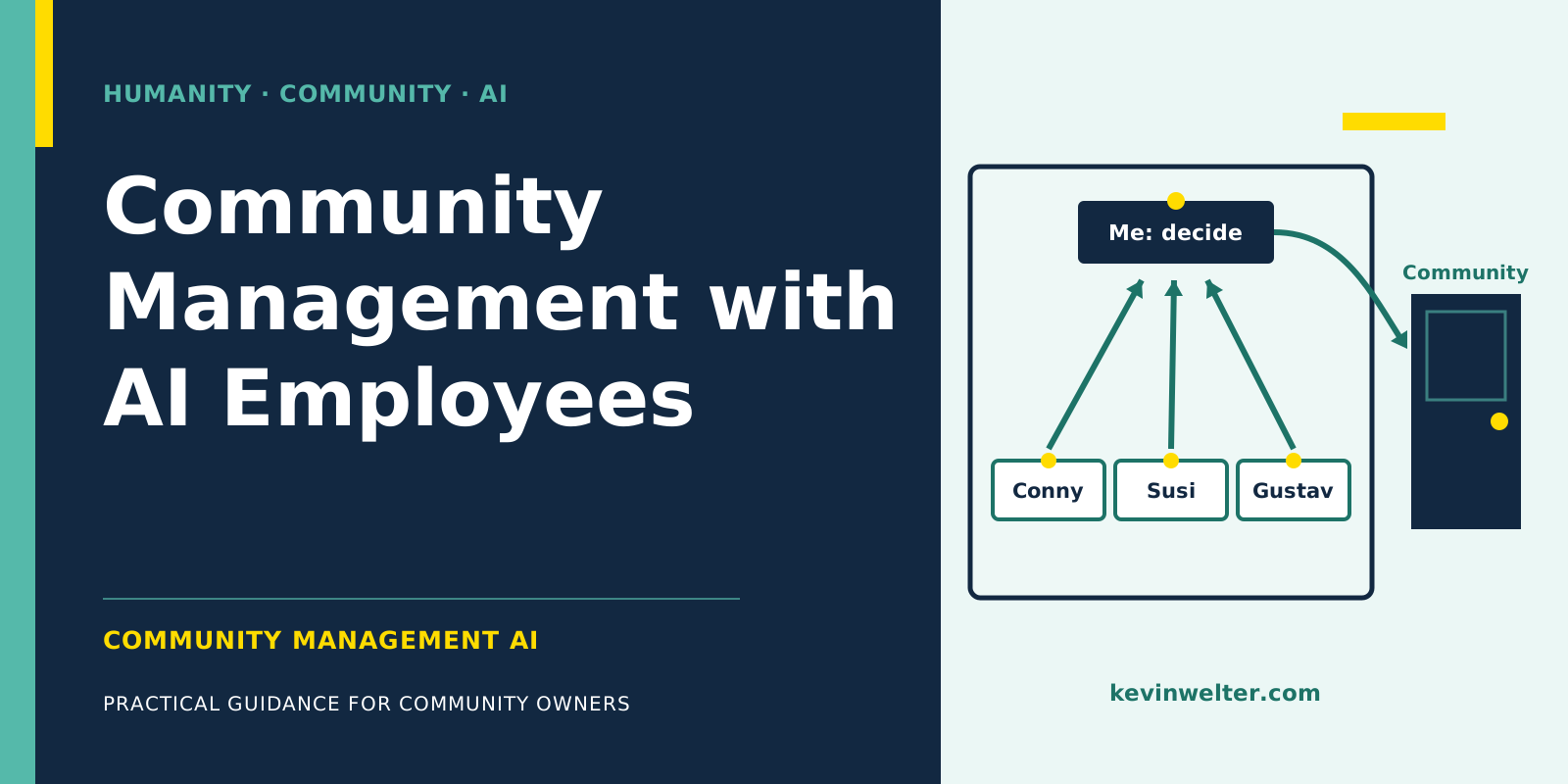
Community management with AI, for me, means: AI employees prepare almost all the work a community creates, and a human decides what of it reaches the community. Call recordings turn into transcripts, lesson texts and recap drafts. Dashboard metrics and answers to the membership questions turn into analyses. Ads get built completely, but paused. Welcome messages and announcements wait as drafts. For the step into the platform, Skool itself draws a line: its policy prohibits bots that post, comment or message others. My own rule: the AI drafts, and personal posts I publish myself. Lessons from call recordings and the notices about them are created by my AI agents in my account in the browser, deliberately and at my own risk, although the policy prohibits it.
Since April 28, 2026, I've run the community Claude Practitioners on Skool: over 90 members, 5.0 out of 5 stars from 5 reviews, 20 courses with 282 lessons, as of September 19, 2026. The community runs in German. My business runs with an AI workforce of fourteen employees, and three of them matter most for the community: Conny for content, Susi for numbers and ads, Gustav for analyzing conversations. What Skool is as a platform I explain in Skool: What It Is and How It Works.
What community management with AI means, and what it doesn't
An AI community manager, for me, isn't a bot that answers questions in the feed. It's a role with its own assignment, its own rules and clear limits, working in the background. What members see is me, through my posts and my calls.
Most of the work in a community is preparation. A call takes an hour, the follow-up takes longer: secure the recording, transcript, summary, chapter markers, lesson text, draft of the notice for the feed. That preparation is the field for an AI agent for community management, and that's where I put AI employees to work.
What doesn't go to an AI in my business: deciding what gets published, what costs money and how I deal with individual members.
The common thread: the AI drafts, I approve
My workforce follows one basic rule from our shared rulebook. Every role may read, analyze and draft without asking. Anything that leaves the house or changes a state, meaning posting, sending emails, launching campaigns, needs my explicit approval. "Just finish it" doesn't count as approval.
For a community, this rule fits especially well, for two reasons. The first is Skool itself. Its platform policy says: "Do not use bots or multiple accounts to post, comment, or message others. Also, refrain from scraping data or making automation requests." The second is trust. Members pay to hear from me. A post nobody read before it went out can contain a name that doesn't belong there, or a number that should have stayed internal.
That leads to the recommendation that runs through every post in this topic area, if you want no risk: the AI prepares outside of Skool, and you take the step inside Skool yourself, using Zapier and the webhook for members and access.
In my business one part runs differently, on purpose. My workflow creates lessons from call recordings, video included, and the notices about them in my account in the browser, the way I would click myself; whole courses it uploads as drafts, and I put them live. Skool's platform policy prohibits this, the account security article prohibits shared logins, and Skool lists content removal, restrictions and account suspension as consequences. I do it only in my own account and carry the risk. To me it's support that does nothing I wouldn't click myself; that's my view, not Skool's. How I keep this apart from official automation is in Skool API and Automation: What Works.
The split of work at a glance
In the "Who decides" column, it's me in every row, and that's deliberate. The column before it shows where the work is. Three rows have no AI role: there I do the preparation myself. "In the browser" means in my account, which Skool's policy prohibits; I do it deliberately and at my own risk.
Content: calls become lessons and posts
According to the help center, Skool lets you download a call recording for 14 days. For speech recognition, the audio file stays on my machine with Whisper. For a hot seat session at the end of August, Conny, my AI editor in chief, turned about 55 minutes of recording into text in about two minutes. Only that step is local: Claude then turns the text into a summary, key points, chapter markers and a lesson with the full transcript underneath, so members can search it; the same page sits in Notion. My workflow creates the lesson with video in my account, and it goes live right away. So if someone talks about health, money or conflict in a call, that gets cleared with me first and stays out of the summary. The workflow is in Skool Classroom: Courses from Call Recordings.
From the same transcript, Conny drafts the recap for the feed, and notices about new recordings follow a fixed template: title with a format emoji, when and what, three to five topics with a benefit, a closing line. No full names, nothing private. The workflow publishes these notices after a test run, with "email all members" off. The disclaimer above applies to both steps. How that fits with approval shows in the hot seat post from August 31. Conny's draft included campaign numbers from my ad account. I shortened it and posted it myself without the numbers. More in Writing Skool Posts with AI, with Approval.
Numbers and ads: Susi analyzes, I launch
Susi, my AI employee for Meta ads, is responsible for the numbers in my business. She analyzes the metrics Skool's admin dashboard shows and the answers to the membership questions. Her rule: every number is only valid as of the date of its source. What Skool's dashboard shows and how to read sources and cancellations is in Skool Analytics: Reading Posts and Members.
A lesson from my own business: until September 19, 2026, the Skool links on my website carried the noreferrer attribute, and Skool counted visitors from there as direct traffic. Since it was removed, Susi lists kevinwelter.com as a separate source. On September 20, 2026, I could trace the first purchase through the website: Google search, blog post, Skool button, the $9 tier, and the membership answer said "Google search". Which channels bring new members is covered in How to Grow a Skool Community. The website itself is looked after by Sebastian, my AI employee for SEO.
For ads, two fixed rules apply. Every campaign starts paused by design, and only I launch it. And Hyros decides about purchases, Meta is only for diagnosis. Take the $9 test for my community: €705.99 for seven new paying members, so €100.86 per buyer, above the threshold of €60 per purchase set on August 30, 2026. Susi's verdict: pause. Along the way we learned that Skool sends purchase events to the Meta pixel itself, and that one purchase can be counted more than once. What that means for your campaigns is in Running Meta Ads to a Skool Community.
The pricing model is my decision anyway. My community started free and has been paid since mid-August, today with Standard at $9 and Premium at $45 a month, cancel monthly (as of September 19, 2026). My reasoning back then, translated: "Free means non-committal. And non-committal doesn't hire an employee." The trade-offs are in Skool Community: Free or Paid?.
Understanding members: analysis with clear rules
The most revealing data in a community is text. What I see in my coffee calls, Susi counted in the transcripts in August: my members aren't people who just want to try AI. They already pay for Claude and want to get more out of it than they manage so far.
The analysis was bigger for a coaching community from my client base with a free and a paid area. The raw data were the posts, comments and call transcripts available to us. They turned into small notes that link to each other, an ordinary folder of text files instead of a graph database. Then we compared buyers and non-buyers as groups. Separate checking agents traced every extracted item back to the transcripts. The patterns: purchase decisions cluster on event days. A large share of buyers was never visibly active in the free area. People who buy decide quickly. Buyers want the same as non-buyers, but are one stage further along. A small entry offer can absorb buying energy. And free members want guidance, not delegation. The limits belong with it: only active members were visible, and "buyer" was approximated from activity, not from payment records. Or as I put it in my community, translated: "The knowledge graph alone is worthless if you don't draw insights and decisions from it." The method in detail is in Buyer Persona with AI from Community Data, the technique behind it in Build a Knowledge Graph From Calls.
If you want to analyze conversations from your own community, you need clear rules first. Gustav, my AI employee for call analysis, describes the clean way: consent first, then the recording, Whisper runs locally, and pseudonymization comes before any further analysis, role instead of name, industry instead of company. Recordings without consent stay out. That isn't legal advice, but it's the route I recommend before the first recording goes into an AI.
Platform and basics: what to settle first
Which community management AI tools you need depends on two layers. The platform is where your members are, for me that's Skool. The AI tools sit next to it, for me Claude as the basis of the workforce and Whisper for local transcription.
What Skool costs and when Pro pays off is in Skool Pricing: Hobby vs Pro and the Fees. Which platform fits when, from Circle to Kajabi to Discord, I compare in Skool Alternatives: Circle, Kajabi, Discord, and what stands out to me day to day as an operator in Skool Review from an Operator's Seat. For operators in Europe, privacy belongs before launch; this isn't legal advice, so check with a lawyer when in doubt.
For the setup itself there are three posts: How to Start a Skool Community for the About page, membership questions, categories and price, Skool Onboarding: The First Seven Days for the path from joining to active member, and Skool Levels and Gamification That Work for points, levels and unlocks. What can be connected to Skool technically, and where Skool's rules draw the line, is in Skool API and Automation: What Works.
If that list looks long: nobody has to set up everything at once. In my community calls we go through questions like these together, one at a time.
AI for coaches: what applies to you
If you run a community as a coach, trainer or consultant, the same split applies, with one extra line: the session itself stays between two people. The work around the community, on the other hand, is largely back office, and that's where AI employees pay off. Which roles make sense for coaches beyond the community is in AI for Coaches: Practice Over Hype.
Frequently asked questions
Can AI manage a community?
It can prepare most of the work: transcribe calls, draft lessons and posts, analyze metrics, build ads. What appears in the community should be decided by a human. On Skool, there's also the policy that prohibits bots from posting, commenting and messaging. My rule: the AI drafts, I approve. Lessons from calls and their notices my workflow creates itself, deliberately and at my own risk, up to account suspension, per Skool.
What is an AI community manager?
For me, a role with its own assignment, its own rules and clear limits that works in the background. Conny drafts content, Susi analyzes numbers and builds ads, and Gustav's rules apply to analyzing conversations. What members see is still me.
Which community management AI tools do I need?
A platform for your members, such as Skool, Circle or Discord, and the AI tools next to it. For me, that's Claude as the basis of the workforce and Whisper for local transcription. For the official connection to Skool there's Zapier and a webhook plugin, both on the Pro plan. That's enough to start.
Can an AI agent post in my Skool community?
Skool's platform policy prohibits bots and multiple accounts that post, comment or message others, as well as scraping and automation requests. That's not a legal assessment. My advice: the AI writes the draft outside of Skool, and you read it and publish it yourself. I deliberately let notices about new recordings go out through the browser and carry the risk, up to account suspension, per Skool.
At what size does AI in community management pay off?
Not at a member count, but at recurring work. As soon as you regularly record calls, write announcements or analyze ads, there's preparation an AI can take over.
Where to go from here
Take the table from this post and fill it in for your own community: who prepares today and who decides. The row where both sit with you, and which costs you time every week, is your first AI role. How I hire and lead roles like that is what I show in my community Claude Practitioners, with ready-made templates for Conny, Susi and Gustav.